Introduction
Using a personal phone number for WhatsApp works fine — until it doesn't. Whether you're separating work from personal life, protecting your privacy on Craigslist or dating apps, or setting up a business line without a second SIM card, a virtual phone number gives you a dedicated WhatsApp presence without exposing your real number.
Getting one set up sounds straightforward, but the results vary widely. Wrong choices lead to:
- Rejected verification codes
- Blocked accounts
- Losing access to your WhatsApp number altogether
The type of number, provider reliability, and how SMS verification is handled all determine whether it works.
Here's what you need to know before picking a provider — and how to get it right the first time.
Key Takeaways
- Virtual numbers let you register for WhatsApp without exposing your personal mobile number
- Paid virtual numbers from established providers are far more reliable for WhatsApp verification than free or temporary alternatives
- Setup involves selecting a provider, choosing a number, downloading WhatsApp, and completing SMS or voice OTP verification
- Prioritize providers with proven SMS delivery, transparent pricing, no contracts, and local or international number availability
- Avoid recycled or temporary numbers — WhatsApp actively blocks many free services, so verify OTP support before purchasing
How to Get a Virtual Phone Number for WhatsApp
Step 1: Decide What Type of Number You Need
WhatsApp requires a number capable of receiving SMS or voice calls—not just virtual phone-only lines. The platform explicitly rejects virtual phone, toll-free, and temporary numbers for standard registration.
Available number types:
- Local numbers (e.g., US area codes like 212, 310, or 415) - Work reliably for WhatsApp verification and appear domestic to contacts in that region
- International numbers - Provide country-specific presence (UK, Canada, Australia, etc.) for users needing to appear local to international audiences
- Toll-free numbers - Generally rejected by WhatsApp for consumer accounts; landlines are only supported on WhatsApp Business via voice call
Choose based on your use case:
- Privacy-focused individuals → US or international local number to keep personal details separate
- Small business owners → Local number in your target market for professional credibility
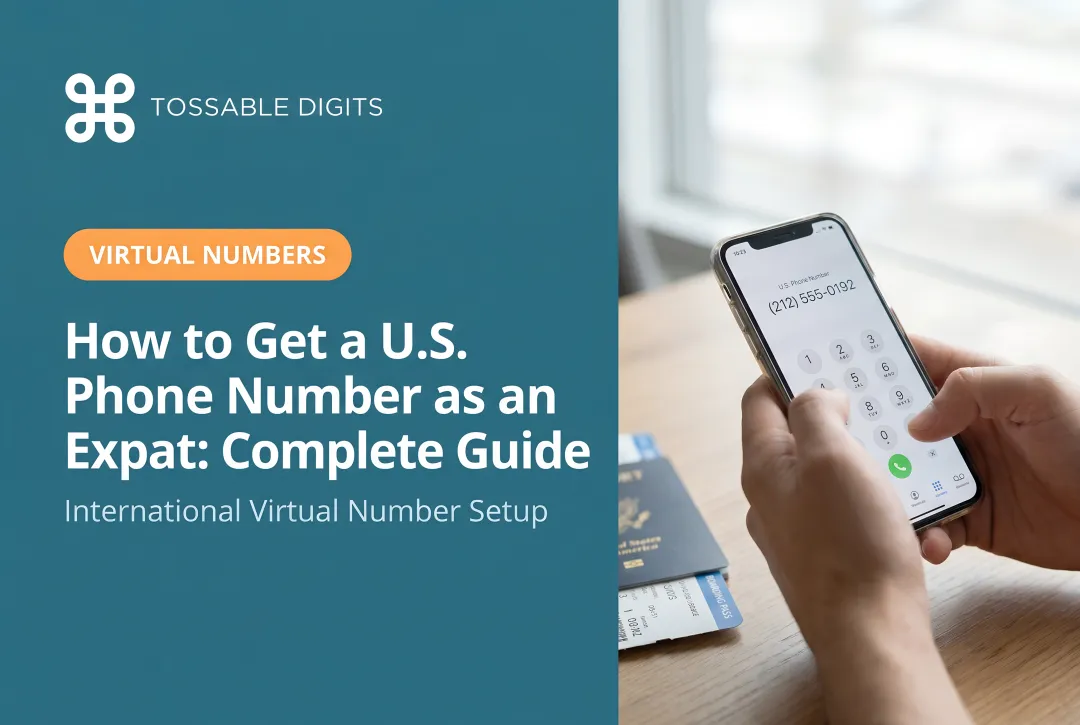
- Travelers and expats → US local number to maintain domestic presence while abroad
- Remote workers → International number matching your client's region
Step 2: Choose a Reliable Virtual Number Provider
The provider is the most critical decision. The number must support SMS or voice OTP delivery, come from a licensed telecom or virtual phone provider, and not be a recycled or shared line flagged by WhatsApp.
Critical provider requirements:
- Delivers SMS and voice calls reliably (WhatsApp's primary verification methods)
- Offers dedicated numbers, not shared or recycled lines
- Provides transparent pricing with no hidden fees
- Includes all core features (SMS, call forwarding, voicemail) in every plan
Tossable Digits provides dedicated US, Canada, and international numbers with SMS support, no contracts, and every feature—call forwarding, voicemail, robocall blocking—included in every plan at no extra charge.
Step 3: Select and Purchase Your Number
Once you've chosen a provider, the selection process is simple:
- Log into the provider's platform
- Choose your country and area code
- Select a number from available inventory
- Complete your purchase — the number activates immediately
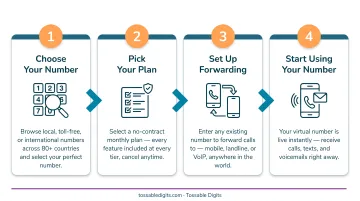
Reputable providers like Tossable Digits make numbers available immediately after purchase with no waiting period, allowing you to proceed directly to WhatsApp verification.
Step 4: Install WhatsApp and Enter Your Virtual Number
Download the WhatsApp or WhatsApp Business app from your device's app store. Open the app, select your country code, and enter the virtual number exactly as it appears in your provider dashboard.
Important: For US numbers, the country code is +1. Enter the number once without duplicating the country code.
Step 5: Complete Verification
WhatsApp will send a 6-digit OTP via SMS (preferred) or voice call. Log into your provider's dashboard or mobile app to retrieve this code. The code typically arrives within seconds but can take up to a few minutes.
If SMS fails:
- Refresh your provider dashboard inbox
- Wait the full timeout period (usually 5 minutes)
- Select "Call me" in WhatsApp to receive the code via automated voice call instead
Once you enter the code, your WhatsApp account is verified and ready to use.
When Should You Use a Virtual Number for WhatsApp?
A virtual number makes the most sense when privacy, a professional presence, or cross-border reach matter to how you use WhatsApp.
Strongest use cases:
- Freelancers and online sellers keeping personal numbers out of client conversations
- Small businesses running a dedicated WhatsApp Business line on a separate number
- Travelers and expats who need a US number while living or working abroad
- Remote workers handling client communication across multiple regions
- Property managers and teachers who deal with the public but want their personal contact details protected
When a virtual number is less practical:
- You only need WhatsApp for personal use and already have a spare SIM
- You require a completely free, no-cost solution long-term (free options carry real trade-offs)
- You need a landline-only number (WhatsApp supports landlines only on the Business app via voice call)
What to Look for in a Virtual Phone Number Provider
The provider you choose directly determines whether WhatsApp verification succeeds and whether your number remains stable over time.
SMS and Voice OTP Delivery Reliability
This is the single most important factor. The provider must reliably receive SMS messages — WhatsApp's verification code depends on it. Research whether the provider has known issues with OTP delivery or blocks from major messaging platforms before purchasing.
Industry data shows SMS OTP delivery failure rates can reach 15-20% in certain regions due to carrier filtering. Choose providers with proven track records for telecommunications infrastructure.
Pricing Transparency and Contract Terms
Look for clear monthly pricing with no hidden fees and no long-term contracts. The ability to cancel anytime protects users who only need a number short-term.
Tossable Digits operates with no contract required and all features included in every plan, which removes the risk of being locked in or charged separately for SMS, voicemail, or call forwarding.
Number Availability and Type
Confirm the provider offers the country and area code you need. For WhatsApp, local numbers (not toll-free-only) tend to work more reliably for verification.
Check that local US, Canadian, or international numbers are available depending on your target market. Providers with extensive inventory give you more selection and immediate activation — Tossable Digits carries 12+ million numbers across 80+ countries.
Feature Set Included
Beyond verification, consider what the provider includes:
- Call forwarding to any phone globally
- Voicemail-to-email delivery
- SMS receiving and forwarding
- Robocall blocking
- Two-factor authentication support
Each of these becomes useful the moment your WhatsApp account is live and you start receiving real calls or messages.
Provider Reputation and Support
Check for accreditations such as a BBB A+ rating, customer reviews, and support availability. A provider with a track record of reliability reduces the risk of number deactivation or OTP delivery failures at critical moments.
Tossable Digits has maintained an A+ BBB rating since its founding in 2005 and offers live chat support alongside detailed troubleshooting documentation — useful if verification runs into snags.
Free vs. Paid Virtual Numbers for WhatsApp
Free virtual number services (such as Google Voice or temporary SMS sites) are widely searched but come with significant limitations for WhatsApp use.
Free option limitations:
- Most free numbers are shared among many users, meaning WhatsApp may have already flagged or blocked them
- OTP delivery is unreliable due to carrier filtering of virtual phone numbers
- Accounts registered on these numbers are harder to recover if access is lost
- Security risks are real: one study tracking 17,000 disposable numbers found widespread abuse for fraudulent account creation and 2FA bypassing
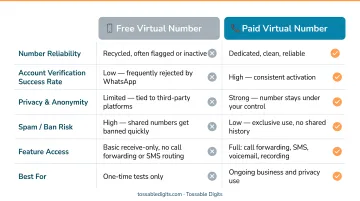
Google Voice is usable for WhatsApp if you have a US address and an existing US number for initial verification — but it's classified as virtual phone and frequently rejected by WhatsApp. For international users or those without a US SIM, this option is effectively closed.
The case for paid providers:
A dedicated virtual number from a reputable provider costs a predictable monthly amount (typically $5–15), delivers OTPs reliably, and ensures the number belongs exclusively to you. This reduces the risk of blocked accounts, failed verification, and the hassle of starting over.
For businesses, the cost is minimal compared to the communication value gained. WhatsApp Business reached over 764 million monthly active users by Q4 2024, making a stable, dedicated number worth the investment.
Common Mistakes and Troubleshooting
Most virtual number failures with WhatsApp are preventable—they typically stem from poor number selection, incorrect setup steps, or using providers that cut corners on number quality. Most virtual number failures with WhatsApp are preventable—they typically stem from poor number selection, incorrect setup steps, or using providers that cut corners on number quality. The four issues below cover the most common failure points and how to fix them.
Using a Recycled or Shared Number
Free or low-cost temporary services reuse numbers across many users. WhatsApp tracks verification history—if a previous user was banned or flagged, that number gets rejected immediately, often before an OTP is even sent.
If verification fails without delivering an OTP, the number is likely already registered or blacklisted. Switch to a dedicated, non-recycled number from a reputable provider.
OTP Not Received
This usually means the provider's number doesn't support SMS receiving, or the message arrived but wasn't surfaced in your dashboard before the OTP expired.
Two quick fixes:
- Log into the provider dashboard immediately after requesting the OTP and refresh the inbox—don't wait
- If SMS fails after two attempts, use WhatsApp's "Call me" option to receive the code via automated voice call
WhatsApp Account Suspended or Blocked
Suspensions typically follow one of three patterns: registering with a spam-flagged number, using unofficial WhatsApp clients (mods), or sending bulk messages too soon after setup.
To avoid this:
- Use only the official WhatsApp or WhatsApp Business app
- Build account activity gradually after verification—don't blast messages immediately
- If suspended, tap "Request review" inside the app; that's the only recovery path WhatsApp offers
A dedicated number makes reactivation easier than dealing with a shared or recycled one.
Number Deactivated by Provider Mid-Use
Losing access to your number mid-use is a real risk with unstable providers or when a plan lapses. Without the number, WhatsApp account recovery becomes difficult or impossible.
Three ways to protect yourself:
- Choose a provider with transparent cancellation policies and a stable track record
- Keep WhatsApp Two-Step Verification PIN enabled—this allows recovery even if the number changes
- Use a number parking service to hold the number at low cost when you don't need active forwarding
Frequently Asked Questions
Can I get a virtual phone number for WhatsApp?
Yes, virtual phone numbers work for WhatsApp as long as they support SMS or voice OTP delivery and are assigned from a reputable provider. Shared or temporary numbers are less reliable and frequently blocked.
How to get a virtual phone number for WhatsApp verification?
Choose a provider that supports SMS delivery, purchase a local or international number, enter it in WhatsApp during setup, and retrieve the OTP from your provider dashboard. Voice call fallback is available if SMS fails.
Is it safe to use a virtual number for WhatsApp?
It is safe when using a dedicated number from a licensed, reputable provider. Risks arise with shared or temporary numbers that may have been previously flagged by WhatsApp or used for spam.
Is a WhatsApp number free?
WhatsApp itself is free to use, but obtaining a virtual phone number for registration typically involves a monthly fee from the provider (usually $5–$15). Free options exist but carry reliability and account-safety trade-offs.
Can I get a temporary number for WhatsApp?
Temporary numbers work for initial verification but carry real risks for ongoing use. WhatsApp may block them, and losing access to the number locks you out of account recovery and Two-Step Verification.
How can I get a US WhatsApp number?
A US virtual phone number with a +1 area code can be obtained from a virtual number provider like Tossable Digits — local US numbers with SMS support, no long-term contract required.