Introduction
Picture this: A real estate agent misses a high-value client call because she's showing a property and can't monitor her office phone. A consultant loses business because potential clients hesitate to call his personal cell number. A small marketing agency can't track which advertising channel is generating calls without hiring a receptionist to ask every caller how they found the company.
Each scenario comes down to the same root problem: traditional phone systems tie businesses to physical locations, blur personal and professional boundaries, and can't keep up with how people actually work. A virtual PBX solves all three.
This guide covers what a virtual PBX is, how it works, how it compares to traditional systems, the key features to look for, and how to get set up in under an hour — no IT team or hardware required.
TLDR:
- Virtual PBX is a cloud-hosted phone system that routes calls over the internet, replacing hardware with software
- Cuts telecom costs by 40-50% compared to traditional PBX systems
- IVR, call recording, and voicemail-to-email included at every plan level
- Works on any device — desk phone, laptop, or smartphone — from anywhere
- Setup takes less than an hour with no technician required
What Is a Virtual PBX?
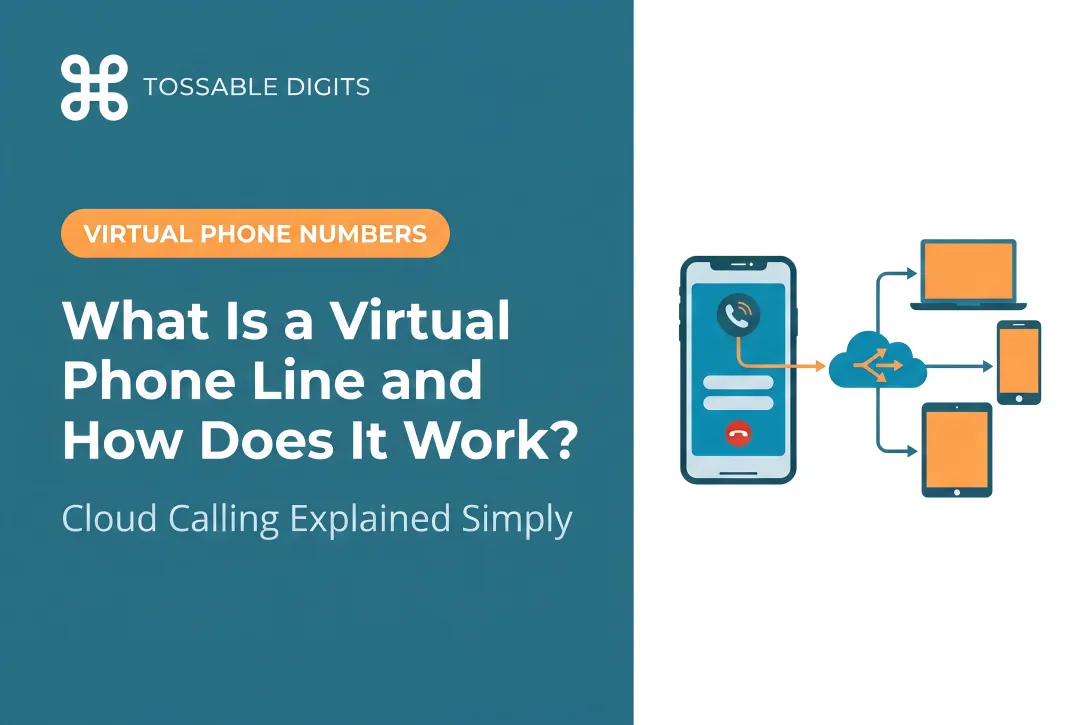
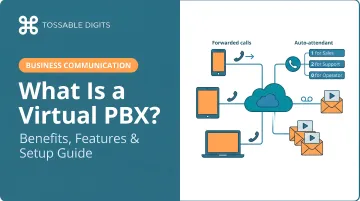
A virtual PBX (Private Branch Exchange) is a cloud-hosted phone system that manages and routes calls over the internet using virtual phone (Voice over Internet Protocol). Instead of physical switchboards, on-site servers, and copper wiring installed in your office, everything runs through software accessible from any internet-connected device.
The global hosted PBX market reached $11.20 billion in 2023 and is projected to hit $31.07 billion by 2030, growing at 16.7% annually. That consistent growth reflects a straightforward shift: businesses are dropping expensive legacy hardware for software they can manage from anywhere.
Clarifying the Terminology
You'll encounter several terms that essentially mean the same thing:
- Virtual PBX – emphasizes the system is hosted remotely, not in your office
- Cloud PBX – highlights the cloud infrastructure that powers it
- Hosted PBX – indicates a third-party provider manages it
- IP PBX – can refer to either cloud-hosted or on-premises systems using virtual phone
When evaluating providers, these terms are interchangeable. All four describe the same fundamental concept: a phone system delivered via the cloud rather than physical equipment.
How a Virtual PBX Works
Understanding the call flow helps clarify why virtual PBX systems are so flexible:
- Inbound call arrives at your business number (local, toll-free, or international)
- Converted to digital data packets using virtual phone technology
- Routed through provider's cloud servers using Session Initiation Protocol (SIP) and Real-time Transport Protocol (RTP)
- System applies pre-configured rules based on time of day, caller ID, department selection, or other criteria
- Call delivered to the right person on their desk phone, laptop softphone, or mobile device—wherever they are
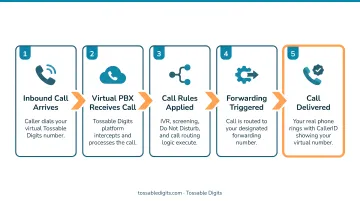
Calls travel over the internet rather than traditional copper phone lines or PSTN circuits. That's what makes the system hardware-free and location-independent: you need only an internet connection, not dedicated phone infrastructure.
Reliability is built into the design. Providers run calls across multiple data centers in different regions, so if one server goes down, traffic automatically shifts to backup infrastructure. Top providers maintain 99.999% uptime—less than six minutes of downtime per year.
Virtual PBX vs. Traditional PBX: Key Differences
Traditional (on-premises) PBX systems require physical hardware—switching consoles, dedicated servers, extensive wiring—installed directly in your office. Upfront capital expenditures can range from $500 to over $1,000 per user, plus ongoing IT maintenance costs. Scaling means purchasing additional equipment and scheduling technician visits to install it.
Virtual PBX replaces all of that with a subscription-based cloud service.
| Dimension | Traditional PBX | Virtual PBX |
|---|---|---|
| Installation | Requires on-site hardware installation, wiring, technician visits | Activate numbers online in minutes, configure via web portal |
| Upfront Cost | $1,000-$10,000+ hardware investment | Zero upfront hardware costs |
| Ongoing Costs | Maintenance fees, repair costs, per-change technician visits | Predictable monthly subscription ($15-$20/user) |
| Scalability | Buy new equipment, schedule installations | Add users instantly via admin dashboard |
| Remote Access | Tied to physical office location | Work from anywhere with internet access |
| Feature Updates | Manual upgrades, often additional costs | Automatic updates included |
The table makes one thing clear: traditional PBX locks every change behind a hardware intervention. Adding a user, opening a new location, or enabling a feature all require a technician. With a virtual PBX, those same changes take minutes in a web dashboard.
Do Businesses Still Use Traditional PBX?
Yes, legacy systems remain in operation at some larger organizations, particularly those with large on-premises investments. However, the global PBX market is shifting toward cloud solutions, driven by cost savings, remote work demands, and the rising cost of keeping aging hardware running. Many enterprises are actively migrating to cloud-hosted platforms rather than continuing to maintain equipment that vendors are phasing out.
Key Benefits of a Virtual PBX System
Cost Savings
Virtual PBX eliminates upfront hardware purchases, maintenance fees, and per-change technician costs. Instead of capital expenditures, you pay a predictable monthly or annual subscription. Companies switching from legacy PBX to cloud PBX report average cost reductions of 40-50% in annual telecommunications expenses.
You avoid paying for:
- Physical servers and switching equipment
- On-site installation and wiring
- Ongoing hardware maintenance contracts
- Technician visits for system changes
- Expensive equipment replacements every 5-7 years
Scalability and Flexibility
Adding or removing users, phone numbers, or locations requires no hardware—just a few clicks in your admin portal. This makes virtual PBX ideal for businesses expecting growth, seasonal call volume fluctuations, or frequent organizational changes.
In practice, that flexibility looks like:
- Add five extensions in 10 minutes when new sales reps start
- Configure call routing for a second office location without touching hardware
- Spin up temporary toll-free numbers for a holiday promotion, then remove them when it ends
Remote Work Readiness
Between 2019 and 2021, the number of U.S. employees primarily working from home tripled from 5.7% to 17.9%. Virtual PBX supports this shift by allowing employees to make and receive calls on any device—desk phone, mobile, laptop—from anywhere with an internet connection. The system presents your business number regardless of where team members are physically located.
A sales team spread across three time zones can still answer under one company number, with call routing rules ensuring the next available rep always picks up.
Professional Presence for Any Size Business
Even solo operators and small teams can present an enterprise-grade phone experience. Auto attendants greet callers with "Press 1 for Sales, Press 2 for Support" menus. Custom greetings and extension dialing create the impression of a larger, organized operation—without hiring a receptionist or investing thousands in hardware.
For freelancers and consultants, this means keeping personal and business calls separate while projecting professionalism to clients who might otherwise assume you're working from your kitchen table.
Business Continuity and Disaster Recovery
Because the system lives in the cloud, calls reroute to mobile devices or alternate locations instantly if your primary office becomes inaccessible—whether due to a power outage, a natural disaster, or anything else. On-premise hardware has no equivalent fallback: when the equipment goes down, so does your phone system.
Must-Have Virtual PBX Features
Not all virtual PBX systems are created equal. Focus on providers that include core features without forcing you into expensive tier upgrades.
Core Call Management Features
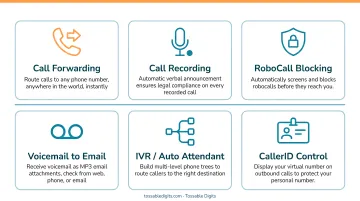
- Auto Attendant (IVR): Automated menus route callers to the right department without a live receptionist. Greetings like "Press 1 for Sales, Press 2 for Support" handle distribution 24/7.
- Call Forwarding (Find Me/Follow Me): Routes calls to multiple devices in sequence or simultaneously. No answer on your desk phone in 20 seconds? The system tries your mobile, then a colleague, then voicemail.
- Call Queues: Places callers in organized queues with hold music and periodic announcements during peak periods—no busy signals.
- Extension Dialing: Internal staff reach each other via short extensions (dial 102 for accounting) instead of full phone numbers.
Communication and Visibility Features
- Voicemail-to-Email: Voicemails arrive as MP3 attachments in your inbox—no dialing in to check messages.
- Call Recording: Captures calls for QA, training, and compliance. Compliance note: Federal law requires one-party consent, but 11 states including California, Florida, and Illinois require all-party consent. Tossable Digits includes automated verbal announcements to both parties when recording is active.
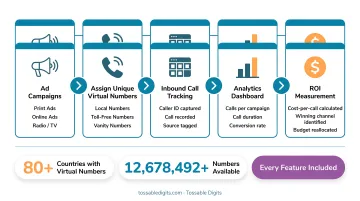
- Virtual Number Groups: Assign different numbers to advertising channels (Google Ads, print, radio) to track which campaigns drive calls—a direct line to measuring marketing ROI.
Integration and Access Capabilities
- Web-Based Admin Portal: Manage settings, view call data, and configure routing rules from any browser—no software to install.
- Mobile App Access: Make and receive calls, check voicemail, and manage settings from your smartphone. Your business number travels with you.
- API Access: Connect your phone system to CRMs like Salesforce or HubSpot to auto-log calls, sync contacts, and trigger workflows based on call activity.
One thing worth checking before you commit to a provider: whether these features come standard or sit behind a higher-priced tier. Tossable Digits includes IVR, call forwarding, call recording, voicemail-to-email, unlimited SMS, and RoboCall Blocking in every plan—unlike competitors who charge per feature.
Who Should Use a Virtual PBX?
Small Businesses and Solo Professionals
Real estate agents, consultants, freelancers, and educators are among the strongest fits for virtual PBX. A dedicated business number keeps personal and professional calls separate, projects credibility to clients, and eliminates the need for a receptionist or office hardware.
There are 34.7 million small businesses in the United States, employing 45.9% of the American workforce. For most, traditional PBX systems are financially out of reach—but virtual PBX delivers the same capabilities at a fraction of the cost.
Remote and Distributed Teams
Employees spread across time zones or working from home can be unified under a single business phone system. Calls route intelligently to whoever is available regardless of location. A customer calling your New York number might reach a team member in California, Texas, or overseas—completely transparent to the caller.
As 78% of SMBs now use public cloud for at least some business applications, virtual PBX fits naturally into cloud-first business models.
Marketers and Businesses Tracking Campaigns
Assign different virtual numbers to different advertising channels—one for Google Ads, another for Facebook, another for billboards. By tracking which number receives calls, you measure which campaigns are generating actual customer interest, not just clicks or impressions.
Virtual number groups make this straightforward:
- Assign a unique number to each campaign or channel
- Monitor call volume per number in real time
- Cut spend on channels that generate traffic but no calls
- Redirect budget toward campaigns with proven response rates
How to Set Up a Virtual PBX in Simple Steps
Unlike traditional PBX installations that require weeks of planning and on-site technician visits, virtual PBX systems can be fully operational in under an hour.
Step 1 – Choose a Provider and Select Your Numbers
Identify what type of number fits your needs:
- Local numbers – establish community presence in specific cities or area codes
- Toll-free numbers – project national reach and remove cost barriers for customers
- International numbers – provide local access points for global customers
Tossable Digits covers local numbers in 500+ US and Canadian cities, all standard toll-free formats (800, 888, 877, 866, 855), and international numbers across 84 countries, with no contracts and the option to cancel anytime.
Step 2 – Configure Your Call Routing and Features
Log into the web portal to set up:
- Auto attendant/IVR greeting – record or upload your menu prompts
- Call forwarding rules – define which device or number receives calls, in what order, during what hours
- Voicemail-to-email – specify the email address for message delivery
- Call recording – enable if needed for compliance or training
Step 3 – Start Using It on Your Existing Devices
Download the mobile app or access the web interface. Because virtual PBX runs over the internet, there's no new hardware to purchase. Existing smartphones, computers, or desk phones connect right away.
Minimum bandwidth requirements per concurrent call:
| Codec | Bandwidth Needed (Per Direction) |
|---|---|
| G.711 | ~80 Kbps |
| G.729 | ~24 Kbps |
| Opus | ~40 Kbps |
For quality voice calls, keep one-way latency under 150 milliseconds. Standard broadband connections handle multiple concurrent calls comfortably.
Frequently Asked Questions
What is a virtual PBX system?
A virtual PBX is a cloud-hosted phone system using virtual phone to route and manage calls without on-site hardware. It delivers the same functions as traditional PBX—routing, voicemail, extensions, auto attendant—but through the internet instead of physical equipment.
Which is better, PBX or virtual phone?
virtual phone is the underlying technology (voice calls over the internet) while PBX is the system that manages and routes those calls. A virtual PBX is built on virtual phone. For most businesses, the real choice is cloud-based vs. on-premises PBX—and cloud wins on cost, flexibility, and remote access.
Do businesses still use PBX systems?
Yes, PBX systems remain widely used, but the shift toward cloud/virtual PBX is accelerating. Enterprises are migrating from legacy hardware to cloud-hosted solutions to cut costs, support remote workers, and shed aging equipment.
Is a virtual phone number legal?
Virtual phone numbers are completely legal in the US and most countries. They're standard business tools for call forwarding, privacy, and communication management—regulated under the same telecommunications laws as traditional numbers.
How much does a virtual PBX cost?
Costs vary by provider and plan. Most charge per user per month (typically $15–$20), though some use flat-rate annual pricing. Tossable Digits includes all features in every plan with no contracts, avoiding the per-feature charges common in tiered enterprise pricing.
Can I use a virtual PBX as an individual or very small business?
Virtual PBX isn't just for large companies—individuals, freelancers, and small businesses are among the most common users. It provides a professional phone presence, separates work calls from personal numbers, and requires no hardware or IT support to maintain.