Introduction
Your phone number follows you everywhere — it's on marketplace listings when you sell furniture on Facebook, printed on real estate flyers, shared with freelance clients, and scribbled on business cards. For millions of people, using a single personal number for everything creates tangible problems: unwanted follow-up calls long after a transaction ends, no separation between work and personal life, and the creeping discomfort of strangers having permanent access to your primary contact information.
Virtual phone lines have emerged as a practical solution to these challenges. People use them not just to run businesses, but to shield their identity when selling online, maintain professional boundaries without carrying two devices, and stay reachable while traveling internationally, all without signing contracts or installing hardware.
Despite their growing popularity, most people don't fully understand how the technology works, what it costs, or whether it's right for them. This guide breaks down each of those questions so you can decide with confidence.
Key Takeaways
- A virtual phone line lives in the cloud and routes calls over the internet to any device you choose
- Callers dial a normal-looking number; you answer on your phone, laptop, or tablet without exposing your real number
- Routes your voice as data packets over broadband using virtual phone — no traditional phone line required
- Common uses include privacy protection, separating business calls, traveling abroad, and tracking ad campaigns
- No hardware needed, no long-term contracts required
What Is a Virtual Phone Line?
A virtual phone line is a telephone number that exists independently of any physical device, SIM card, or landline. It lives in the cloud and forwards incoming calls to whichever phone, app, or computer you designate. Also called an online number or Direct Inward Dialing (DID) number, it functions as a real, standard-format phone number that anyone can dial from any device.
Traditional phone numbers are permanently tied to a specific device and location. A second number for business, privacy, or travel once meant new hardware, a carrier contract, and often a physical address. Virtual lines remove all those requirements — you can activate a new number in minutes, forward calls anywhere, and cancel without penalty.
What a virtual phone line is not:
- Not a second SIM card requiring a separate device
- Not a virtual phone app like WhatsApp (which requires both parties to use the same app)
- Not a single-use disposable number — virtual lines carry full call management, voicemail, and SMS features
When someone calls your virtual number, they experience it exactly like dialing any other phone number. They don't need an app, account, or special software.
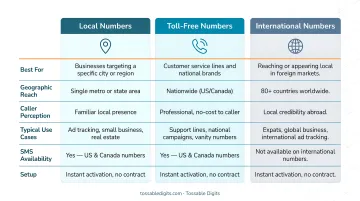
That caller experience is consistent across all three main number types available through virtual providers like Tossable Digits.
Types of Virtual Phone Numbers
- Local numbers — Area-code-specific numbers that make you appear local to a region, even if you're based elsewhere. Tossable Digits offers local numbers across 500+ cities in all 50 US states and Canada, letting businesses establish regional presence without a physical office.
- Toll-free numbers — Prefixes like 800, 888, 877, 866, and 855 that callers dial for free. Regulated by the FCC and administered through Responsible Organizations (RespOrgs), these signal an established, professional operation.
- International numbers — Country-specific numbers that maintain your presence in another country without requiring you to be there. Tossable Digits provides numbers from 84 countries, covering travelers, expats, and businesses with global customers.
How Does a Virtual Phone Line Work?
When someone dials your virtual number, the call doesn't travel through copper wires or a cell tower tied to your SIM card. It routes through a virtual phone-based cloud system that converts voice into data, transmits it over the internet, and delivers it to whichever device you've configured to receive it.
Incoming Call and Routing
A caller dials the virtual number, which is registered with a virtual phone provider's cloud-based system. The provider's servers receive the incoming call signal and look up where that number is configured to forward — this can be a mobile phone, a desktop app, or multiple devices set to ring simultaneously.
This routing is pre-configured by the account holder. You set the rules — ring a mobile number during business hours, send to voicemail after 6 PM — and those rules execute automatically each time a call comes in.
Voice Transmission via virtual phone
Voice over Internet Protocol (virtual phone) converts the caller's voice into small digital data packets. These packets are transmitted over the internet — via WiFi, 4G, or 5G — and reassembled into audio on the receiving end.
Two protocols handle the heavy lifting:
- SIP (Session Initiation Protocol) — manages call setup, control, and termination
- RTP (Real-time Transport Protocol) — carries the actual audio data end-to-end in real time
Call quality comes down to two measurable factors: latency and packet loss. The ITU-T G.114 standard sets a 150ms ceiling for one-way latency, and packet loss must stay below 3% for acceptable audio. On stable broadband, virtual phone routinely meets both thresholds.
What the Caller and Recipient Experience
For the caller, dialing a virtual number is no different from dialing any standard number. It rings, someone answers, and the conversation proceeds normally — there's no indication a virtual system is involved.
On the receiving end, the call appears on whichever device is configured: phone, laptop, or app. The caller sees the virtual number as the outgoing caller ID, not the recipient's personal number.
This privacy works in both directions. Outgoing calls placed through the virtual number also display it as the caller ID, keeping the user's real number out of the picture entirely.
Who Uses Virtual Phone Lines — and Why It Works for Them
Virtual phone lines serve a wide range of people beyond large enterprises. The common thread across all use cases: control over who can reach you, and on what terms.
Privacy-First Use Cases
Online sellers face severe risks when exposing personal numbers on public listings. A University of British Columbia study on Facebook Marketplace revealed users face harassment, scams, and physical safety concerns when sharing contact details. Virtual numbers act as a disposable buffer — if unwanted contact begins, the number can be changed or cancelled without affecting your real phone.
Common privacy scenarios:
- Real estate agents publishing contact info on property listings
- Teachers reaching students' families without sharing personal numbers
- Freelancers working with multiple clients who need professional boundaries
- Online sellers on eBay, Craigslist, or Facebook Marketplace
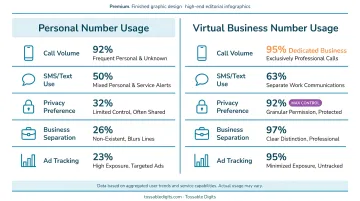
Despite the US independent workforce reaching 72.7 million in 2024, 77% of self-employed individuals still use their personal mobile numbers for business. Yet 71% of those who adopt a separate business line report healthier work-life balance.
Business and Professional Use Cases
The business applications are equally practical:
- Small business owners get professional-sounding numbers without dedicated office lines
- Remote and distributed teams route calls to wherever staff are working that day
- Marketing professionals assign separate virtual numbers to each ad campaign to track which channel drove each call
That last use case has real stakes: inbound phone calls convert at 10 to 15 times the rate of web form leads. Marketers deploy dynamic number insertion (DNI) across multiple virtual numbers to accurately attribute high-value phone leads to specific campaigns.
Travel and International Use Cases
Expats, frequent travelers, and anyone working across time zones can keep a US number active while abroad, ensuring they remain reachable on a familiar number without paying international roaming fees.
Major US carriers charge $12 per day for international travel passes, and pay-per-use data costs $2.05 per MB without a plan. By using a virtual phone-based virtual number over local WiFi, travelers bypass these roaming fees.
Tossable Digits serves exactly this need, offering US, Canada, and international number availability so users keep a working number — and a familiar caller ID — regardless of where they're calling from.
What to Look for in a Virtual Phone Line Provider
Not all virtual phone line providers are equivalent. The features included in a plan matter significantly.
Key Features to Evaluate
Essential capabilities:
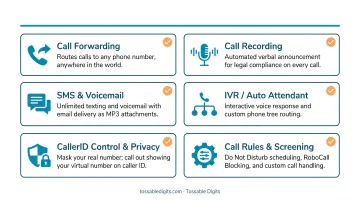
- Call forwarding flexibility: Route to multiple devices, set time-of-day rules
- SMS/text messaging support: Receive texts through app or email
- Voicemail-to-email delivery: Get voicemails as MP3 attachments
- Call recording: Capture conversations for training and compliance
- IVR (Interactive Voice Response): Route callers through professional menus
- Robocall blocking: Filter spam automatically
In 2025, US consumers received 52.5 billion robocalls, with 57% categorized as scams or unwanted telemarketing — a 15.4% increase in scam volume from the previous year. Strong spam filtering isn't optional at that volume.
Free vs. Paid Plans: Total Cost Reality
| Feature Category | Free Tiers | Paid SMB Plans ($10-$25/user/mo) |
|---|---|---|
| Number Management | Limited to 1 number | Multiple numbers, shared team numbers |
| Call Routing | Basic forwarding only | IVR, Ring Groups, Call Queues |
| Analytics & Recording | None | Call recording, real-time dashboards |
| Integrations | Limited personal ecosystem | CRM integrations (Salesforce, HubSpot) |
| Support | Community forums only | 24/7 live chat, email, phone support |
Free virtual numbers come with significant limitations: restricted features, recycled numbers that may be flagged as spam, no call recording, and poor portability. A Princeton University study found that 66% of recycled numbers were still tied to previous owners' online accounts, enabling potential account hijacking.
Contract Terms and Privacy Protections
Before committing to a provider, check for:
- No long-term contract: Month-to-month plans keep you flexible
- Number porting: Transfer your existing number to the virtual system without losing it
- Transparent data handling: Clear privacy policies, not just fine-print disclaimers
- Verifiable track record: BBB accreditation and third-party press coverage are useful signals when support options are limited
Number porting is federally protected: The FCC mandates Local Number Portability (LNP), requiring simple ports to be processed in one business day. Providers cannot refuse to port a number even if you owe outstanding balances.
STIR/SHAKEN compliance matters: The FCC requires STIR/SHAKEN caller ID authentication to combat illegal spoofing. If a provider doesn't enforce this framework, your outbound calls may be mislabeled as "Spam Likely" by receiving carriers.
Frequently Asked Questions
What is a virtual phone line?
A virtual phone line is a cloud-based phone number not tied to any physical device or SIM card. It routes calls over the internet to any device the user chooses, functioning as a regular phone number that anyone can dial.
Do virtual phone numbers show your real number?
No. Virtual phone numbers keep your real number private. Incoming callers see only the virtual number, and when you call out from the virtual number, it appears as the caller ID — so your personal number stays hidden either way.
Can virtual phone numbers receive texts?
Yes, most virtual phone numbers support SMS. Texts sent to the virtual number are received through the provider's app or online dashboard, and many providers also deliver them via email notification.
Are free virtual phone numbers really free?
Free virtual numbers exist (such as Google Voice for personal use) but come with significant limitations: restricted features, recycled numbers that may be flagged as spam, no call recording, and limited portability. For regular professional or privacy use, paid plans provide far greater reliability.
How do I make a call using a virtual phone number?
Sign up with a provider, select a number, and use the provider's app or a forwarding-enabled device. The caller simply dials the virtual number as they would any standard number, and the call is routed over the internet to your chosen device.
Do you need WiFi for a virtual landline?
An internet connection is typically required for app-based virtual calling, but some providers offer call forwarding to a regular cell or landline number — so you can receive calls over cellular coverage without a WiFi connection.