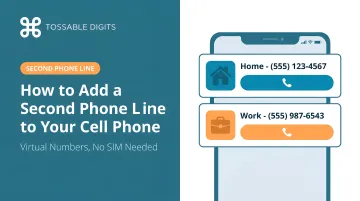
This guide breaks down the three main methods to add a second line to your existing cell phone, explains what each requires, walks through setup step-by-step, and highlights the mistakes that can derail the process before you share your new number.
Key Takeaways
- Add a second phone line without buying new hardware — virtual number apps are the fastest, most flexible option
- Three methods: virtual number/virtual phone apps, dual SIM (eSIM or physical), and carrier add-on plans
- Choose local, toll-free, or international area codes — calls forward straight to your existing phone
- Costs range from free (Google Voice) to $10–$25/month, with virtual plans often including more features than carrier add-ons
- Avoid common pitfalls: test free trials, check feature limits, and set up call forwarding before sharing your new number
When Do You Actually Need a Second Phone Line?
A second line isn't just for business owners. The use cases are deeply practical and relatable.
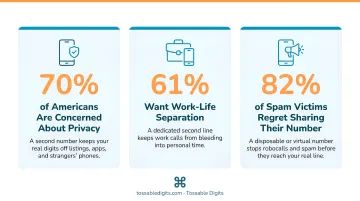
Privacy protection tops the list. 75% of U.S. employees use their personal cell phones for work, blurring boundaries and exposing personal numbers to colleagues, clients, and vendors. A few common scenarios:
- A freelance graphic designer who doesn't want 11 p.m. calls about logo revisions
- A landlord managing three properties who needs tenant calls separated from family time
- A teacher coordinating with parents who shouldn't have to sacrifice privacy for accessibility
Then there's the online marketplace reality. Selling on Craigslist, Facebook Marketplace, or OfferUp means strangers get your contact information. 48% of online daters report unwanted behaviors including unsolicited messages and continued contact after expressing disinterest. A second "public-facing" number keeps your real number private and reduces spam exposure — critical when U.S. consumers received 52.5 billion robocalls in 2025.
Work-life separation is another driver. 55% of Americans struggle to switch off after work, and 47% feel pressured to check emails outside work hours. A second line with business hours and scheduled voicemail creates mental boundaries — all on one device.
Three Ways to Add a Second Line to Your Cell Phone
There are three distinct methods, each with different hardware requirements, costs, and feature sets. The right choice depends on whether you prioritize flexibility, carrier integration, or the lowest upfront cost.
Virtual Number App (virtual phone)
virtual phone (Voice over Internet Protocol) apps assign you a real phone number that routes calls and texts over an internet connection to your existing phone. No SIM swap, no hardware needed, works on any smartphone.
Key advantages:
- Choose any local, toll-free, or international area code
- Calls forward to your primary number automatically
- Features like voicemail, call recording, SMS, and call forwarding typically included
- Number stays with you if you change phones or carriers
One trade-off: virtual phone requires a data or Wi-Fi connection to function. Call quality depends on your internet connection — free or low-cost apps can have inconsistent reliability. Some services switch to cellular as fallback, but this isn't universal.
As of June 2024, 65 million interconnected virtual phone subscriptions existed in the United States, with 78% of business wireline connections using virtual phone — proof the technology is mature and widely trusted.
Dual SIM / eSIM
Most phones made in the last 3–4 years support two SIMs simultaneously (physical + eSIM, or two eSIMs). Each SIM holds a separate number from a separate carrier plan.
How to check support:
- iPhone: Settings > General > About (scroll down to find EID or IMEI). iPhone XS, XS Max, XR, and later support eSIM.
- Android/Samsung: Settings > Connections > SIM Manager or Settings > Network & internet > SIMs > Add SIM > Set up an eSIM.
Each SIM requires its own carrier plan, adding monthly cost, and features are limited to basic calling and texting. Battery life also takes a hit: Dual SIM Dual Standby (DSDS) forces the modem to monitor both networks continuously, which drains power faster in areas with weak signal.
eSIM penetration in the U.S. reached 41% following the iPhone 14 launch, making this option increasingly accessible.
Carrier-Added Second Number
Major carriers offer add-on second number services that integrate into the phone's native dialer — no new app needed.
Pricing (as of 2026):
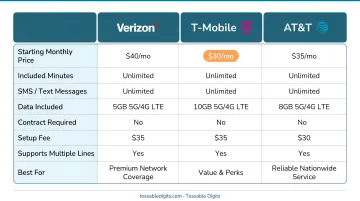
- Verizon Second Number: $15/month, or $10/month for myPlan Unlimited customers. Includes unlimited talk and text in the U.S., Mexico, and Canada, with data provided by the primary line.
- T-Mobile DIGITS: $10/month (with AutoPay) for Talk & Text line. Supports up to 5 numbers on the same device.
- AT&T NumberSync: $20/month for Connected Car. AT&T doesn't offer a direct $10–$15 second number add-on comparable to Verizon or T-Mobile.
Limitations: Tied to that carrier. Features are limited to basic talk/text without advanced capabilities like call recording, IVR, or international numbers. Canceling the plan means losing the number.
How to Add a Second Phone Line Using a Virtual Number Service
Virtual number apps are the fastest path — setup takes under 10 minutes and no store visit or hardware is needed. Here's the end-to-end process.
Step 1: Decide on Your Number Type
Choose between:
- Local number: Matches a specific area code to build local trust (e.g., 212 for New York, 415 for San Francisco)
- Toll-free number: Professional, works for business use (1-800, 1-888, 1-877, etc.)
- International number: Useful for travelers or businesses with overseas contacts
Not every provider covers all three types, so confirm availability before committing. Tossable Digits, for instance, offers local numbers in over 500 U.S. cities and Canada, toll-free numbers, and international numbers from 84 countries.
Step 2: Sign Up for a Virtual Number Service
Create an account with a virtual phone number provider. Tossable Digits, for instance, offers local, toll-free, and international numbers with no contracts required. Every plan includes call recording, unlimited SMS, voicemail-to-email, IVR, and robocall blocking.
Most reputable services offer month-to-month flexibility so you can test call quality before locking in. When creating your account:
- Verify your account with an existing phone number (where calls will be forwarded)
- Select a payment plan
- Confirm no long-term contract is required so you can cancel or change anytime
Step 3: Configure Your Second Line Settings
Once your number is active, a few quick settings get it running the way you need:
- Call forwarding: Route incoming calls to your primary cell so the second line rings on your existing phone
- Custom voicemail greeting: Record a separate greeting for the second line so callers get the right response
- Business hours / Do Not Disturb: Send calls straight to voicemail after a set time — useful if you stop taking work calls after 6 p.m.
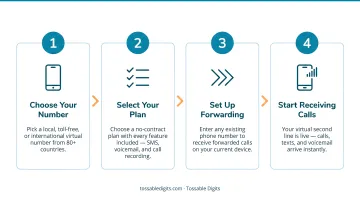
Step 4: Test and Start Using Your Second Line
Place a test call from another phone to your new number and confirm it rings correctly on your cell with a distinct notification or label, then send a test SMS to verify it comes through the app.
Share the new number in the appropriate contexts (business cards, listing sites, work emails) while keeping the personal number private. The second line is now active and functioning on one device.
Key Features to Evaluate Before Choosing a Second Line Service
Not all second line services include the same features — some charge extra for SMS, voicemail transcription, or call recording.
Must-have feature checklist:
- Unlimited SMS (confirm if restricted to personal use or allows business messaging)
- Voicemail (ideally voicemail-to-email with MP3 attachments)
- Call forwarding
- Call recording
- Ability to choose local, toll-free, or international numbers
Before committing, verify these three factors as well:
- Number portability: The FCC requires interconnected virtual phone providers to support Local Number Portability (LNP), so you can keep your number if you switch providers within the same area. Confirm the service also supports porting out before you sign up.
- Contract terms: Month-to-month plans are safer than annual commitments. Locking into a yearly plan for a number you may not need long-term ties up money without flexibility.
- App reliability: A second line is only useful if calls and texts arrive consistently. Check recent app store ratings on Apple and Google Play — both platforms weight recent reviews to reflect current performance. Apps without updates in over a year may have compatibility issues with newer iOS or Android versions.
Common Mistakes to Avoid When Adding a Second Phone Line
Three mistakes trip up most people before they ever make their first call:
- Skipping the trial period. Most services offer 7–30 day trials. Test call quality, SMS delivery, and voicemail reliability with real calls before sharing the number publicly.
- Choosing based on price alone. Low-cost plans often cap voice minutes, exclude SMS, or charge extra for voicemail transcription. A $6/month plan with a 100-minute limit can cost more than a flat-rate plan once overages hit — always check the full feature list, not just the headline price.
- Sharing the number before configuring it. If call forwarding isn't set up, calls go unanswered. If voicemail has no custom greeting, callers hear a blank or generic box — both undermine credibility for business use.
Frequently Asked Questions
How much does it cost to add a second line to a cell phone?
Costs range from free (Google Voice) to $10–$15/month for most virtual number or carrier add-on plans, and up to $25+/month for business-tier services. Virtual number services typically include more features per dollar than carrier add-ons, which often limit you to basic talk and text.
Can I add a second line to my cell phone?
Yes — any smartphone can add a second line using a virtual number app regardless of carrier or device model. Dual SIM is also an option for phones that support it, but is not required. Virtual number apps work on any iPhone or Android device with internet connectivity.
Is it cheaper to add someone to your phone line?
Adding a line through a carrier family plan is often cheaper per line than two separate plans, but it shares data and account access. A virtual second number is the better choice when privacy or independent feature control matters, since it operates without touching your existing plan.
Will my personal number still work after I add a second line?
Adding a virtual second line does not affect the primary number in any way. Both numbers operate independently on the same device, with the personal number tied to the SIM and the second number tied to the app. Your primary carrier service remains untouched.
Can I keep my second number if I switch phones?
With a virtual number service, the number is tied to your account, not the device. Switching phones just requires downloading the app and logging in, so your number stays active — unlike SIM-based numbers, which require a physical transfer.