Introduction
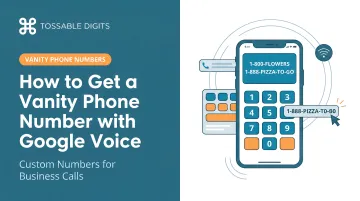
Many small business owners search Google Voice hoping to snag a memorable number like 1-800-FLOWERS — only to hit a wall. Google Voice does offer a keyword search that can surface numbers matching specific digit patterns, but the results depend entirely on what's available in your area code at that moment.
Here's the bigger issue: Google Voice does not offer true vanity numbers. The platform provides only local numbers, not the toll-free vanity numbers (1-800, 1-888) that businesses typically associate with professional branding.
This article explains exactly what Google Voice can and can't do for vanity numbers, and where to look if you need a real custom number for your business.
Key Takeaways
- Google Voice's number search filters available local numbers by digit patterns, not custom-configured vanity numbers
- Selection is limited to whatever random numbers exist in Google's pool for your area code
- No toll-free vanity numbers (1-800-KEYWORD) are available on any Google Voice plan
- Providers like Tossable Digits offer true vanity numbers with searchable inventories and toll-free options
- Google Voice suits basic privacy needs — not branded, memorable numbers
What Google Voice Actually Offers for Vanity Numbers
A true vanity number is a phone number where specific digits intentionally spell out a word or phrase on a telephone keypad—think 1-800-FLOWERS (1-800-356-9377) or 1-888-BUY-CARS. These numbers are custom-configured to match your desired keyword. Google Voice doesn't work this way.
Google Voice provides a pattern-based number search that filters an existing pool of randomly assigned local numbers. When you enter a keyword during number selection, Google maps the letters to their numeric equivalents (SOLD = 7653) and displays available numbers containing that digit sequence, typically at the end of the number.
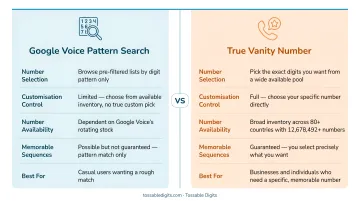
That doesn't guarantee a clean, memorable result. You might search for "SOLD" and receive options like (555) 123-7653 or (555) 987-7653, where the area code and prefix digits don't align with your branding intent.
How the Number Selection Screen Works
The process begins when you enter a city, area code, or keyword into Google's number picker. The system returns available numbers matching your search criteria, but availability is unpredictable. If no numbers containing your preferred pattern exist in the current pool for your target area code, you simply cannot get that combination through Google Voice. There's no mechanism to reserve or request specific numbers.
Personal vs. Business Version Distinction
The free personal version (voice.google.com) allows number selection during signup at no cost. The paid business version requires both a Google Workspace subscription and a Google Voice for Business plan:
The free personal version (voice.google.com) allows number selection during signup at no cost. The paid business version requires both a Google Workspace subscription and a Google Voice for Business plan:
- Google Workspace: starts at $7/month per user (annual) or $8.40/month (flexible)
- Google Voice for Business: starts at $10/month per user
- True minimum cost: $17.00–$18.40 per user monthly
The number selection tool works the same way as the free version. You're paying for team management and compliance features, not better vanity number capabilities.
Privacy vs. Vanity: Different Features
Google Voice does mask your real phone number from recipients. Calls show your Voice number on caller ID, not your underlying forwarding number. Useful for privacy — but completely separate from vanity number functionality. Google doesn't officially call its number search feature "vanity numbers," and for good reason: it's limited pattern matching within a finite inventory, nothing more.
How to Get a Vanity-Style Number with Google Voice
Step 1: Confirm Your Version and Set Up Your Google Account
Before you begin:
- Choose your version: Free personal (voice.google.com, select "For Personal Use") or paid business
- Set up Workspace first if using the business version—you cannot purchase Google Voice without an active Workspace account
- Prepare a forwarding number: Google Voice requires a linked cell or landline before number activation
Step 2: Search for a Number Using a Keyword or Pattern
Navigate to the number selection screen and enter your desired word or phrase. Google Voice converts letters to their phone keypad equivalents automatically (HELP = 4357, DEAL = 3225).
Limitations to keep in mind:
- Results depend entirely on availability in your chosen area code
- No matches? Try a different area code or a shorter keyword
- The pattern may appear only at the end of the number, not throughout
- Google draws from a fixed pool — it cannot generate custom numbers on demand
Step 3: Select and Confirm Your Number
Once you find an acceptable option, select it and confirm. Important: Changing your number later costs $10, so verify the number reads as intended before finalizing.
Business users have one extra step: an admin must assign the number through the Google Voice Admin Console after Workspace activation. Only then does the number become active for that account.
Step 4: Link Your Forwarding Number and Configure Basic Settings
With your number confirmed, complete the remaining setup:
- Link a forwarding number: Connect your personal cell or another line so incoming calls route correctly
- Set your voicemail greeting: Record a greeting that reflects how callers will use the number
- Configure call forwarding rules: Set schedules, simultaneous ring, or do-not-disturb windows as needed
- Test the number: Dial it from an external phone to confirm the vanity pattern works when spoken aloud or entered manually
Key Limitations to Know Before You Commit
Availability Is the Biggest Constraint
Google Voice draws from a finite pool of local numbers. If your preferred keyword pattern isn't available in your target area code, you have no recourse. Dedicated vanity number providers maintain searchable databases of millions of numbers and accept special orders — Google Voice offers only what's in stock at that moment.
No Toll-Free Vanity Numbers
Google Voice provides only local numbers—no toll-free prefixes (1-800, 1-888, 1-877, 1-866, 1-855) are available on any plan. This rules out the most recognizable format for business vanity numbers.
The numbers from Somos tell the story:
- Vanity toll-free numbers achieve a 72% recall rate after a 30-second ad — versus just 5% for numeric numbers
- 58% of consumers say they prefer dialing vanity numbers over numeric ones
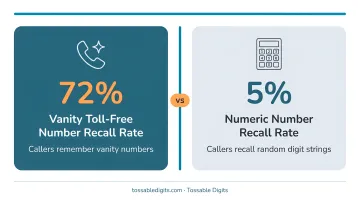
For businesses where brand recall is the goal, Google Voice's local-only inventory is a hard constraint worth understanding upfront.
Business Version Offers No Vanity Number Advantages
The $17+ monthly cost for Google Voice for Business (Workspace + Voice) buys you team management features, call routing, and compliance tools — not a better vanity number search. The number picker is identical to the free version. You're paying for infrastructure, not customization.
Common Mistakes to Avoid
Before you commit to a number, watch out for these common pitfalls:
- Google doesn't spell words for you. Searching a keyword returns numbers that contain those digits — not numbers that actually spell your word. Area code digits can break the pattern entirely (searching FLOWERS might land you a number that reads awkwardly when spoken aloud).
- Test readability before committing. Write out your target number in full numeric form and dial through it mentally. Because Google Voice maps letters to digits automatically, confirm the conversion produces what callers will actually hear and remember.
- The paid Business tier won't give you better vanity options. The number search works the same way in both free and paid versions. If true vanity number control is what you need, a dedicated virtual number provider — built specifically for custom number selection — is a more reliable path.
Better Alternatives for a True Vanity Phone Number
If securing a true vanity number is your primary goal—with specific keyword control, toll-free options, or broader availability—dedicated virtual number providers offer purpose-built tools that Google Voice cannot match.
Dedicated Vanity Number Providers (e.g., Grasshopper, RingCentral, Phone.com)
Grasshopper offers searchable vanity toll-free numbers with keyword lookup tools, letting you browse multiple prefixes (800, 877, 888, 833, 844, 855, 866) and refresh results until the right match appears. Vanity numbers are included in base plans—no extra fee.
RingCentral and Phone.com support both local and toll-free vanity numbers with wildcard search (using asterisks for flexible digits, like ****-SHIP), giving businesses tighter control over the final format. RingCentral charges a $30 one-time setup fee plus $4.99/month for vanity numbers.
Virtual Phone Number Services with Flexible Local Number Selection
Tossable Digits offers virtual phone numbers—local, toll-free, and international—with flexible call forwarding to any phone globally, no contracts, and features like voicemail-to-email, call recording, and SMS built into every plan. Unlike Google Voice, which requires a Google account and (for business use) a full Workspace subscription, Tossable Digits lets you secure a number independently and port it later if needed.
That difference shows up across the feature set:
- Search millions of toll-free (1-800, 1-888, 1-877, 1-866, 1-855) and local vanity combinations
- Vanity numbers cost the same as standard numbers—no premium pricing or extra fees
- Every number includes 60+ features: IVR auto-attendant, call recording, voicemail-to-email, SMS on toll-free
- Cancel anytime—no contracts or early termination fees
- Park a vanity number now and activate it later without paying for full service
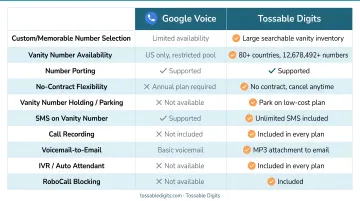
For individuals and small businesses that want a vanity number without locking into the Google ecosystem, Tossable Digits covers everything in one place.
Keeping Google Voice as Your virtual phone Layer While Using a Separate Vanity Number
Some businesses use a hybrid approach: obtain a true vanity number through a dedicated provider and forward it to a Google Voice number. This lets you use Google Voice's free or low-cost virtual phone infrastructure to handle calls while presenting a branded, memorable number to the public.
This works well for existing Google Voice users who want to add branding without rebuilding their setup. If you're starting fresh, though, a single provider that bundles vanity numbers with virtual phone features keeps things simpler from day one.
Frequently Asked Questions
Can I get a vanity number with Google Voice?
Google Voice does not offer true vanity numbers. It has a keyword-based search that surfaces available local numbers containing specific digit sequences. The result is not a guaranteed custom number and depends entirely on what's available in your area code at that moment.
Does Google Voice conceal your real number?
Yes, when you make calls through Google Voice, recipients see your Google Voice number on caller ID—not your underlying forwarding number. This makes it useful for separating personal and business communications.
Is Google Voice free for vanity number searches?
The free personal version allows number selection (including keyword searches) at no cost, but this version is restricted to personal use. Business use requires a paid Google Workspace subscription ($7.00–$8.40/month) plus a Google Voice plan ($10/month), totaling $17.00–$18.40/month minimum per user.
Can I get a toll-free vanity number with Google Voice?
No. Google Voice does not offer toll-free numbers (1-800, 1-888, etc.) on any plan. It only provides local numbers. Businesses needing toll-free vanity numbers must use dedicated vanity number providers like Tossable Digits, Grasshopper, or RingCentral.
What is the difference between Google Voice's number search and a real vanity number?
A true vanity number is a specific, intentionally configured number where chosen letters spell a word (e.g., 1-800-FLOWERS). Google Voice's search filters an existing pool of randomly assigned local numbers for those that happen to contain a matching digit pattern.
What are the best alternatives to Google Voice for getting a true vanity phone number?
Dedicated virtual number providers such as Tossable Digits, Grasshopper, and RingCentral offer searchable vanity number inventories, toll-free options, and greater keyword control than Google Voice. Tossable Digits charges no premium for in-stock vanity numbers and operates on a no-contract model with all features included.