Introduction
Switching carriers means nothing if you lose your existing phone number. Between two-factor authentication, banking apps, business contacts, and years of personal connections, your number is tied to your identity in ways that are hard to untangle. Federal number portability rules enforced by the FCC mean you don't have to surrender your AT&T wireless number when you switch.
Most customers can complete the port without ever calling AT&T. Your new provider submits the request, and the transfer happens through automated carrier systems behind the scenes.
This guide covers:
- What information AT&T requires to release your number
- Exactly how long the port takes (and what slows it down)
- The most common rejection reasons — and how to avoid them
Whether you're switching to a major carrier or a virtual number service, the process is the same — and simpler than most people expect.
Key Takeaways
- Number porting lets you keep your AT&T wireless number when switching — carriers are legally required to release it
- Generate a Number Transfer PIN from AT&T before starting (expires in 4 days for consumer accounts, 14 days for business)
- Collect your AT&T account number and exact billing address — mismatches trigger automatic rejections
- Never cancel AT&T service before the port completes; canceling early locks the number
- Full process takes 1–2 weeks when information is submitted correctly
What Is Number Porting and Why Do People Port Out of AT&T?
Number porting is the federally mandated process that allows you to transfer an existing phone number from one carrier to another without losing it. The FCC's Local Number Portability rules require AT&T and all US carriers to release numbers upon a valid request — it's your number, and you have the legal right to take it with you.
Why customers leave AT&T:
- 56% of people who recently switched carriers saved money, per Consumer Reports — lower bills are the top motivator
- Moving to virtual phone or virtual phone services that forward calls across devices without a separate SIM
- Consolidating work and personal lines under one app or virtual number platform
- Dropping AT&T over coverage gaps, network quality, or recurring customer service issues
Whatever the reason, the stakes are real. Your number is linked to contacts, bank accounts, two-factor authentication, and years of communication history. Changing it means updating every one of those connections — which is why most people port rather than start fresh.
Port Out vs. Port In:
This guide covers porting out of AT&T (moving your AT&T number to a new provider). The process is always initiated by the gaining provider, not AT&T. If you're bringing a number to AT&T from another carrier, that's a port in — handled through AT&T's onboarding when you sign up for service.
What You Need Before Porting Your AT&T Number
Account Eligibility Requirements
Your AT&T account must meet specific criteria before a port can proceed:
- Active and in good standing: No suspensions, past-due balances, or disconnections on the account
- No pending orders: Pending address changes, plan modifications, or device orders can block a port for 30–45 days
- Wireless Account Lock disabled: AT&T's Wireless Account Lock is a security feature that prevents unauthorized number transfers and SIM swaps — if enabled, all port requests are automatically rejected
How to disable Wireless Account Lock:
- Open the myAT&T app
- Navigate to Profile → Account Security → Wireless Account Lock
- Toggle the setting to Off
Number Transfer PIN (Critical)
AT&T requires a 6-digit Number Transfer PIN to authorize any port request. This PIN is account-level (covers all numbers on your account) and has strict expiration rules:
- Consumer accounts: Expires after 4 days
- Business accounts: Expires after 14 days
Generating your PIN too early is one of the most common mistakes. If your new provider's submission is delayed even slightly, an expired PIN means automatic rejection and you'll need to start over.
When to generate it: Only when you're ready to immediately submit the port request to your new provider — aim to submit within 24–48 hours.
AT&T Account Number
Your account number format varies by account type:
- Consumer wireless: Typically 9 digits
- Business wireless: 13–15 digits
- Home phone: 12–15 digits
Log in to your AT&T account at att.com and navigate to Billing and Payments, or check the top-right corner of any AT&T bill.
Exact Billing Address
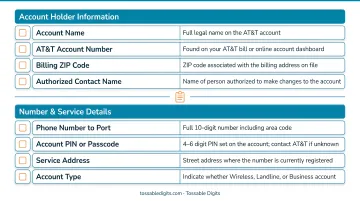
A mismatched billing address is the most common rejection trigger. The address you submit must exactly match what AT&T has on file — including:
- Street abbreviations (St. vs. Street, Ave. vs. Avenue)
- Apartment, suite, or unit numbers
- Spacing and punctuation
Pull up your most recent AT&T bill and copy the billing address character-for-character. Even a single character mismatch triggers automatic rejection.
Additional Documentation
Some receiving providers require a recent AT&T bill for verification. Download a PDF or screenshot before starting the port process — it's easier to have it ready than to track it down mid-transfer.
How to Port Your AT&T Wireless Number: Step-by-Step
The port request is always initiated by the new/gaining provider — never by AT&T directly. Your role is to generate the PIN, gather credentials, and submit them accurately. AT&T then receives and processes the release request automatically through carrier-to-carrier systems.
Step 1: Generate Your Number Transfer PIN
You have three methods to generate your Number Transfer PIN:
Method 1: AT&T Mobile App (Consumer Only)
- Open the app and tap your Profile icon
- Navigate to Manage or remove account → Settings
- Select Transfer phone number
- Tap Request new PIN
- PIN appears on-screen immediately
Method 2: Online Account (Consumer & Business)
- Log in to att.com
- Go to Account Profile → Settings
- Select Transfer phone number
- Click Request new PIN
- PIN displays on-screen
Method 3: Dial *PORT (Consumer Only)
- From your AT&T device, dial *PORT
- Follow the voice prompts
- Enter your account passcode when requested
- PIN is sent via text message
Important restrictions:
- Only users with primary online access can generate a PIN
- Business wireless accounts cannot use the app or *PORT method — they must use the online account or contact AT&T directly
Step 2: Gather Your Required Account Information
Collect the following details and verify each one against your AT&T bill:
- 6-digit Number Transfer PIN (generated in Step 1)
- AT&T account number (found on your bill under Billing and Payments)
- Exact billing address (copy character-for-character from your bill)
- Account holder's name (as it appears on the AT&T account)
Every field must match AT&T's records exactly — even minor discrepancies will reject the port.
Step 3: Sign Up With Your New Provider and Submit the Port Request
Set up service with your new carrier or provider first, then submit the port request through their onboarding or porting form. The new provider uses your credentials to submit a formal port request to AT&T via automated carrier systems.
Critical: Do not cancel your AT&T service at this stage. Canceling before the port completes locks the number and makes it unportable. Your AT&T service must remain active throughout the process.
Step 4: Monitor the Port Status and Confirm Completion
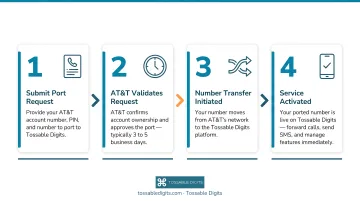
Once submitted, expect 1–2 weeks for the process to complete. AT&T handles the back-end automatically:
- AT&T receives the port request from your new provider
- AT&T's automated systems validate your credentials
- If everything matches, AT&T approves the request and schedules a port completion date
- On the completion date, your number moves to the new provider and AT&T service on that number ends automatically
What to watch for:
- Confirmation from your new provider that the port is complete
- Your new device showing full service (calls, SMS, data)
- Voicemail and messaging working correctly on the new service
If you haven't received confirmation within the expected window, the timeline below helps you gauge when to follow up:
Timeline factors:
- Consumer wireless ports: Typically complete within 3–7 business days once a clean request is received
- Business accounts: May take longer depending on account complexity
- Requests with errors: Go back to the new provider for correction, resetting the clock by several days
You can check your port status at AT&T's Port Status page.
Common Mistakes That Get AT&T Port Requests Rejected
Port requests are fully automated — and even a single data mismatch will trigger an instant rejection. These are the most common reasons ports fail:
Information Mismatch (Most Common)
The billing address, account number, or account holder name submitted by your new provider does not exactly match AT&T's records. Even minor differences trigger automatic rejection:
- "St." vs. "Street"
- Missing apartment or suite number
- Extra spaces or punctuation
- Middle initial present or missing
Copy your account number and billing address directly from your most recent AT&T bill. Don't rely on memory or autofill.
Expired Number Transfer PIN
If you generate your PIN days before starting the port, it may already be expired by the time your new provider submits the request — 4 days for consumer accounts, 14 days for business.
Generate your PIN only when you're ready to submit it to your new provider — ideally within 24–48 hours.
Canceling AT&T Service Too Early
If you disconnect your AT&T account before the port completes, the number is released from AT&T's system and becomes unportable. To recover, you must contact AT&T to reactivate the line, often adding days to the process.
Leave your AT&T service active until your new provider confirms the port is complete and all services are working.
Wireless Account Lock Enabled
AT&T's Wireless Account Lock is a security feature designed to prevent unauthorized porting and SIM-swapping fraud. If enabled, any port request is automatically blocked until you disable it.
Before initiating a port, open the myAT&T app and navigate to Profile → Account Security → Wireless Account Lock, then toggle it to Off.
When Porting Out of AT&T Isn't the Right Move
Porting is the right solution if you're genuinely switching carriers. But if your goal is privacy or separation of work and personal communications, a full carrier port is more disruptive than necessary.
Scenarios where porting isn't needed:
- You want to keep your real AT&T number private when dealing with online marketplaces, businesses, or new contacts
- You need a second line for work but don't want to carry two devices
- You want to screen calls, record conversations, or add features AT&T doesn't offer
- You need a local presence in multiple cities or countries without additional SIM cards
A Simpler Alternative: Virtual Phone Numbers
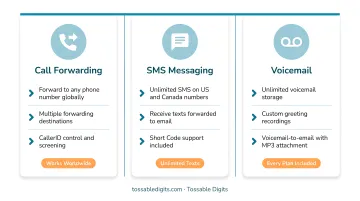
Instead of porting, consider adding a virtual number that rings to your existing AT&T phone. Tossable Digits provides virtual numbers in 80+ countries that forward calls and texts to any device — including your current AT&T phone — without requiring you to cancel or change your AT&T service.
What this solves:
- Keep your AT&T number completely private
- Add unlimited SMS, call recording, voicemail-to-email, and robocall blocking
- Maintain multiple numbers (work, personal, regional) on one device
- No contracts, no hardware, no carrier switch required
That said, if you're set on porting, some numbers can't be transferred regardless of the carrier you're moving to.
Numbers that cannot be ported:
- Numbers outside your original rate center — AT&T doesn't support porting to a different geographic area than where the number was issued
- Numbers on accounts with pending orders (address changes, plan modifications) — these are automatically rejected until the order completes, which can take 30–45 days
- Numbers on disconnected or suspended accounts — reactivation is required before a port request can proceed
If your port is blocked for these reasons, contact AT&T's porting department at 888-898-7685 to explore workarounds or resolve the issue.
Frequently Asked Questions
How do I port my number from AT&T?
Generate a Number Transfer PIN via the AT&T app or online account, gather your AT&T account number and exact billing address, then provide that information to your new provider. The new provider submits the port request on your behalf.
How long does it take to port a number from AT&T?
Consumer wireless ports typically take 1–2 weeks when all information is correct. Business accounts may take longer depending on account complexity. Errors or mismatches reset the timeline, adding several additional days.
How do I keep my phone number without service?
Before canceling AT&T service, port the number to a new active carrier or a number parking service. Canceling service first causes the number to be released and potentially reassigned, making it unrecoverable.
What numbers cannot be ported?
Numbers on accounts with pending orders, accounts that are disconnected or not in good standing, or numbers outside your rate center cannot be ported until those issues are resolved.
What is the AT&T porting department phone number?
You can reach AT&T's porting department directly at 888-898-7685, bypassing general customer service. This number is listed on AT&T's Business Customer Service Contacts page for port-specific support.
How do I port a number to AT&T?
Porting a number to AT&T is initiated through AT&T when signing up for service. Provide your current carrier's account number, PIN, and billing details to AT&T, who then submits the port request to your losing carrier.