Introduction
You're preparing for an international business trip, relocating abroad, or managing overseas contacts, and you need calls to your US iPhone number to reach you reliably without missing critical conversations. The challenge? While iPhones include a built-in call forwarding feature, extending it to international numbers comes with carrier restrictions, hidden costs, and technical requirements that aren't immediately obvious.
Major US carriers—AT&T, Verizon, and T-Mobile—block native call forwarding to international destinations entirely. The forwarding feature exists on your device, but carrier network policies prevent calls from routing outside the United States.
This guide covers what works, including workarounds through virtual number services, correct number formatting, and when a smarter alternative beats fighting carrier limitations.
Key Takeaways
- iPhone's Settings menu includes call forwarding, but carriers block international destinations at the network level
- Virtual US phone number services bypass this restriction by receiving calls in the cloud and forwarding globally
- Proper international number format requires the + prefix and country code (e.g., +44 7911 123456 for UK)
- Conditional forwarding (when busy/unanswered) uses USSD carrier codes, but these still can't override international blocking
- A virtual phone service like Tossable Digits routes calls globally without carrier restrictions
What to Check Before Attempting International Call Forwarding
Before investing time in setup, understand that carrier policy determines what's possible—not your iPhone's capabilities.
Carrier Restrictions on International Forwarding
All three major US carriers enforce absolute blocks on international call forwarding:
| Carrier | International Forwarding Allowed? | Policy Statement |
|---|---|---|
| AT&T | No | "You can't forward calls to an international number" |
| Verizon | No | "Calls can't be forwarded to an international number" |
| T-Mobile | No | "You can't forward calls to international numbers. You can only forward calls to 10- or 11-digit numbers" |
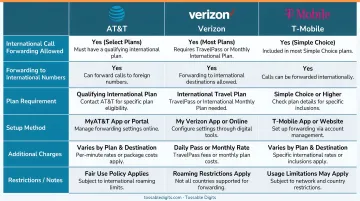
This restriction applies across the board—postpaid, prepaid, premium, and basic plans all face the same wall. No add-on or one-time activation bypasses this carrier-level block. Understanding why carriers do this helps clarify why workarounds need to operate outside the carrier system entirely.
Why Carriers Block International Forwarding
Carriers block international forwarding for two core reasons:
- Billing complexity: Domestic forwarding splits charges cleanly — you pay for the forwarded leg, the caller pays normal rates. International routing breaks that model.
- Fraud exposure: International call forwarding is a known vector for toll fraud, where bad actors exploit forwarded numbers to rack up charges on premium international lines.
Blocking the feature entirely is simpler than policing it on a case-by-case basis.
How iPhone Call Forwarding Works (For Domestic Use)
iPhone's built-in call forwarding works reliably for domestic numbers — but it has hard limits that become obvious the moment you try forwarding to an international destination.
Step 1: Navigate to Call Forwarding Settings
The path varies by iOS version:
- iOS 18 and later: Settings → Apps → Phone → Call Forwarding
- iOS 17 and earlier: Settings → Phone → Call Forwarding
The menu may take several seconds to load as your iPhone syncs with the carrier network.
Step 2: Cellular Connection Requirement
That carrier sync is also why your iPhone must be within cellular network range when configuring forwarding. Apple explicitly states: "You must be in range of the cellular network when you set iPhone to forward calls, or calls won't be forwarded." The setting cannot be saved offline.
Step 3: Enable and Enter Forwarding Number
Toggle Call Forwarding to ON (turns green), then tap "Forward To" and enter the destination number. For domestic numbers, use the 10-digit format. Tap Back to save—there's no separate save button.
Step 4: Test Before Relying on Setup
Call your iPhone from a different device to confirm calls route correctly — if they don't, recheck the number format and verify your carrier supports the forwarding destination.
International Number Formatting (For Virtual Services)
Virtual phone services require numbers in a specific international format — get it wrong and calls simply won't connect.
Required E.164 Format
All international numbers must follow E.164 format. That means:
- Start with a
+prefix - Add the country code (no spaces before the local number)
- Drop the leading zero from the local number
The table below shows correct formatting for common countries:
| Country | Country Code | Local Number Example | Correct Format |
|---|---|---|---|
| United Kingdom | +44 | 07911 123456 | +44 7911 123456 |
| Australia | +61 | 0412 345 678 | +61 412 345 678 |
| Germany | +49 | 030 12345678 | +49 30 12345678 |
| India | +91 | 098765 43210 | +91 98765 43210 |
| Mexico | +52 | 55 1234 5678 | +52 55 1234 5678 |
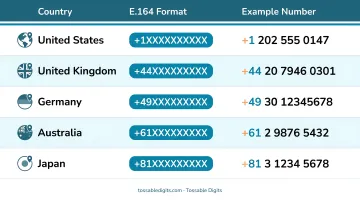
⚠ Watch out: Entering +44 07911 123456 instead of +44 7911 123456 will cause call failures. Always drop the leading zero when adding the country code.
Conditional Call Forwarding Using Carrier Codes
The iPhone Settings menu only supports unconditional forwarding (all calls). To forward calls only when unanswered, busy, or unreachable, you must dial USSD carrier codes directly from the Phone app.
Standard GSM USSD Codes
These codes work on GSM carriers (T-Mobile and AT&T on modern networks), replacing [number] with the full international format:
- Forward when unanswered:
**61*+[country code][number]# - Forward when busy:
**67*+[country code][number]# - Forward when unreachable:
**62*+[country code][number]# - Cancel all conditional forwarding:
##002#
Example: To forward unanswered calls to a UK mobile: **61*+447911123456#
Verizon-Specific Codes
Verizon uses different codes due to legacy CDMA infrastructure:
- Activate forwarding (all calls):
*72followed by the number - Conditional forwarding (no answer/busy):
*71followed by the number - Cancel forwarding:
*73
Why International Destinations Still Get Blocked
These USSD codes work correctly for domestic destinations. The problem is at the carrier level — US carriers block international destination numbers regardless of which code you use. If your forwarding target is outside the US, the network will reject it before the call connects.
One workaround is routing calls through a virtual US number that itself forwards internationally — which sidesteps the carrier restriction entirely.
Common Mistakes and How to Fix Them
Even with the right steps, a few common errors can silently break the whole setup. Here's what to watch for.
Mistake 1: Including the Leading Zero
Entering a number with its local leading zero (e.g., +44 07911 123456 instead of +44 7911 123456) is the most common error. AT&T's international calling guide explicitly warns: "When dialing city and country codes, drop any leading zeros."
Fix: Always strip the leading zero from the local portion of the number.
Mistake 2: Assuming the Feature Works Without Testing
Call forwarding may appear "saved" in settings but fail to route calls if the carrier blocks international destinations or hasn't activated the feature on your account.
Fix: Always test with a live call from a different phone before depending on the setup.
Mistake 3: Leaving Forwarding Active When Returning Home
Leaving forwarding active after returning home means all incoming calls keep routing internationally — and the charges keep coming.
Fix: Disable forwarding immediately when no longer needed via Settings → Phone → Call Forwarding (toggle off) or dial *73 on most carriers.
How Much Would International Forwarding Cost (If Carriers Allowed It)?
Though US carriers block international forwarding, understanding the theoretical cost structure clarifies why virtual alternatives offer better value.
The Billing Model
When call forwarding works, the original caller pays normal rates to reach your US number, but you (the account holder) pay for the second "leg"—the international forwarding portion—at international per-minute rates.
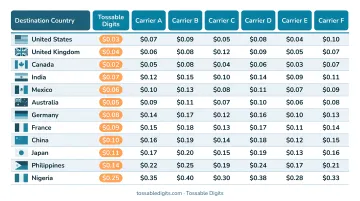
Representative Per-Minute International Rates
These are the per-minute rates that would apply to the forwarded leg under each major carrier's standard pricing:
AT&T International Calling Rates:
- UK: $0.18/minute
- Australia: $0.20/minute
- Mexico: $0.00-$0.20/minute (depending on plan)
T-Mobile International Calling Rates:
- UK: $3.00/minute (or free with Stateside add-on)
- Australia: $3.00/minute ($0.07 with add-on)
- Mexico: $1.00/minute (or free with certain plans)
Verizon International Calling Rates:
- Starting at $0.49/minute depending on destination and add-on packages
The numbers add up fast. A single 30-minute forwarded call to the UK at T-Mobile's standard rate would cost $90 — and that's just one call.
A Smarter Alternative: Virtual Phone Numbers with International Forwarding
For travelers, expats, remote workers, and international businesses, virtual US phone numbers bypass carrier restrictions entirely.
How Virtual Numbers Work
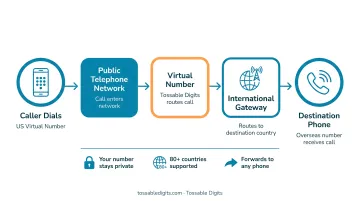
A virtual US phone number isn't tied to a physical SIM or carrier. The number receives calls in the cloud and forwards them to any international destination you specify. You manage forwarding through a web dashboard or mobile app—not through carrier settings or iPhone menus.
Key advantages:
- Bypasses carrier international forwarding blocks completely
- Forwards calls to any global destination without restrictions
- Manages settings via app or web dashboard, not carrier codes
- Includes voicemail-to-email, call recording, and SMS reception
- Offers predictable pricing without per-minute carrier surprises
Tossable Digits: Built for International Call Management
That's exactly what Tossable Digits is built for. The service provides virtual US local and toll-free numbers that forward calls globally—with no carrier restrictions on where those calls land.
How it works:
- Maintain a US local or toll-free number that contacts in the US keep calling
- Receive calls on whatever device or number you're using internationally
- Manage forwarding destinations through the web dashboard or mobile app
- Access voicemail via email (sent as MP3 attachments) from anywhere
Key features for international use:
- Forward calls to any international mobile or landline number
- No carrier restrictions on destination countries
- Voicemail-to-email, call recording, SMS reception (US/Canada numbers), caller ID control, and robocall blocking—all included
- No contracts—cancel anytime without early termination fees
- Port your existing US number in with no porting fees
Tossable Digits has been operating since 2005 and carries BBB accreditation with an A+ rating. One customer noted: "I love that Tossable Digits can forward calls to whatever number I am using in other countries and it doesn't rely on the Internet to reach me."
Practical example: An expat living in Australia maintains a US number through Tossable Digits. Family and business contacts in the US call the familiar US number, unaware the call routes to an Australian mobile. Voicemails arrive as email attachments, accessible worldwide. Total cost stays predictable—transparent monthly pricing instead of per-minute carrier charges.
When iPhone Call Forwarding Isn't Enough
International numbers aside, iPhone's built-in forwarding hits walls even for everyday domestic use.
Limitations of Native iPhone Forwarding
Even for domestic use, iPhone's built-in forwarding restricts you to:
- One forwarding destination: no simultaneous or sequential routing to multiple numbers
- Voice calls only: SMS and iMessages are never included
- iPhone must be powered on and connected to change any settings
- No call logs, voicemail management, or forwarding schedules
- All-or-nothing forwarding: no conditional or time-based rules
Virtual Numbers Solve These Limitations
Virtual phone services like Tossable Digits are built around exactly these gaps. With a virtual number, you can:
- Forward to multiple numbers simultaneously or in sequence
- Receive SMS messages via email or app
- Change forwarding destinations from any device with internet access
- Access detailed call logs and voicemail management
- Configure conditional routing, time-based forwarding, and custom call rules
Frequently Asked Questions
Can you forward calls to an international number on an iPhone?
No. While iPhones include call forwarding settings, all three major US carriers—AT&T, Verizon, and T-Mobile—block international destinations at the network level. The feature appears in Settings, but carrier policies prevent calls from routing outside the United States.
What do the call forwarding codes (*#61, *#62, *#73) do on an iPhone?
These USSD codes configure conditional forwarding: **61*[number]# (unanswered), **62*[number]# (unreachable), **67*[number]# (busy), and *73 to cancel unconditional forwarding. They accept international number formats, but US carriers block international destinations regardless of which code you use.
How do I format an international number when entering it in call forwarding services?
Use E.164 format: start with a + sign, add the country code, then the local number without its leading zero. For example, a UK number 07911 123456 becomes +44 7911 123456. The leading zero must be dropped.
Will call forwarding to an international number still work if my iPhone is turned off?
Device-based forwarding (via iPhone Settings) requires the phone to be on and connected. Carrier-level forwarding (via USSD codes like *72) runs through the carrier's network and works even when your phone is off—but US carriers block international destinations either way.
Does call forwarding on iPhone also forward text messages to international numbers?
No. iPhone call forwarding only applies to voice calls. SMS and iMessages are never forwarded through this feature. To receive texts at international destinations, you'll need a virtual number service that routes SMS via email or app.
What's a cheaper alternative to paying international rates for every forwarded call?
Virtual US phone number services like Tossable Digits offer predictable plan-based pricing instead of per-minute international carrier charges. These services maintain a US number in the cloud, route calls internationally, and charge a flat monthly rate—no per-minute surprises.