Introduction
If you've outgrown Google Voice, you can take your number with you. Google Voice works well for basic use, but it has real limits — unreliable SMS delivery, no call recording, and no IVR for business setups. When those gaps start costing you, it's time to move on.
Moving your Google Voice number to a provider like Tossable Digits is a clean, documented process. This guide covers the exact steps for personal Google Voice accounts — what information to gather, what mistakes to avoid, and what to verify once the port is complete.
Key Takeaways
- Unlock your number first at google.com/voice/unlock — $3 fee (free if you originally ported it into Google Voice)
- Your "account number" is your 10-digit Google Voice phone number; your PIN is your voicemail PIN
- Don't cancel or delete your Google Voice account until your new provider confirms the port is complete
- The porting process typically takes a few hours to 2 weeks depending on the receiving carrier
- This guide covers personal accounts only — Google Workspace accounts follow a different process
Before You Start: What to Prepare
Before initiating a port, gather three things: your account type, number eligibility status, and voicemail PIN. Missing any one of them can stall or reject the transfer.
- Identify your account type. Personal Google Voice accounts (free, tied to a Gmail) follow the process in this guide. Google Voice for Google Workspace (paid, admin-managed) requires a separate port-out procedure through the Admin Console. If you're unsure, check whether your account is managed by an employer or organization.
- Confirm eligibility. Numbers tied to minors' accounts or accounts without completed identity verification may be blocked from porting. Also verify that your receiving carrier accepts numbers with a Google Voice origin — most major providers do, but confirm first.
- Locate your voicemail PIN. This serves as your account PIN during the port request. If you haven't set one, do it now in Google Voice settings under the voicemail section. Setting it in advance avoids rejected port requests; a few carriers may accept "0000" as a fallback, but don't count on it.
How to Port Your Google Voice Number Step by Step
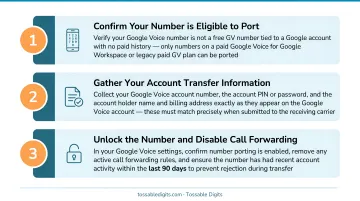
Step 1: Unlock Your Number in Google Voice
Navigate to google.com/voice, click Settings at the top right, go to Account, find the Google Voice number you want to port, and click Unlock. Alternatively, visit google.com/voice/unlock directly.
Pay the $3 unlock fee via Google Pay. If your number was originally ported into Google Voice from a mobile carrier, there is no fee — confirm this before paying.
Once complete, the number status will display "Number unlocked." Screenshot this confirmation page; some receiving providers request proof of unlock.
Step 2: Gather Your Account Information
Your receiving carrier will request specific information to process the port:
- Account number: Your 10-digit Google Voice phone number, no dashes or spaces — this is your account number
- Voicemail PIN: The PIN you use to access Google Voice voicemail, not your Google account password
- Account name: The name on your Google Voice account (typically your Google account holder's name)
- Billing address: The address associated with your Google Voice account. If your provider requires a formal service address that Google Voice doesn't display, reference the address resource at workspace.google.com/terms/service-terms/voice/providers.html
Country-specific requirements vary:
- U.S.: PIN plus the ZIP code of your billing address
- Canada: Customer name and service address ZIP (PIN optional)
- Other countries: Confirm exact requirements with your carrier before submitting
Step 3: Choose Your New Provider and Initiate the Port Request
Sign up with your receiving provider and submit a number port request (also called a Letter of Authorization or LOA). Fill in the fields using the account information you gathered in Step 2.
Critical: Every character must match exactly what Google has on file — no abbreviations, no special characters, numerical values first in addresses. Mismatches are the leading cause of failed ports.
Your new provider contacts the carrier network behind Google Voice (Google Telephony Service Provider/GTSP) directly to process the request. You don't initiate this contact yourself.
Step 4: Wait for Port Confirmation and Monitor Status
Track your port status by going to Google Voice Settings → Account → Track your progress. If account information isn't verified, Google Voice will show an error and allow you to edit and resubmit.
Timeline expectations: The unlock itself is immediate, but the full port can take a few hours to 2 weeks. According to the FCC, simple ports must be processed in one business day, but virtual phone ports like Google Voice often take longer. T-Mobile states that wireless ports typically take 10 minutes to 3 hours, while landline-to-wireless ports take 3 to 10 days.
Information Your New Provider Will Ask For
Porting failures almost always come from mismatched account details — the information must exactly match what Google has on file, not what you assume.
Account Number
Unlike traditional carriers, Google Voice does not assign a separate account number. Your account number for port purposes is your 10-digit Google Voice phone number (no dashes, no spaces). This is the most commonly confused field — provide the phone number itself, not a billing account number.
Voicemail PIN
The PIN field refers to the voicemail PIN used to access Google Voice voicemail from another phone — not the Google account password. Before initiating the port:
- If you have a PIN set, use that exact PIN in the porting form
- If no PIN was set, set one now — some carriers accept "0000," but an actual PIN avoids rejection
Account Name and Billing Address
The account name is the name on the Google Voice account (the Google account holder's name). The billing address should be the address associated with that account.
Google Voice does not always display a formal service address. If your carrier requires one, use the workaround address resource Google provides at workspace.google.com/terms/service-terms/voice/providers.html.
Proof of Unlock (Where Required)
Some receiving providers ask for a screenshot of the "Number Unlocked" confirmation page as billing proof. Save a screenshot of this page immediately after unlocking.
Common Mistakes When Porting Out of Google Voice
Most porting failures come down to a handful of avoidable errors. Watch out for these before you submit your request:
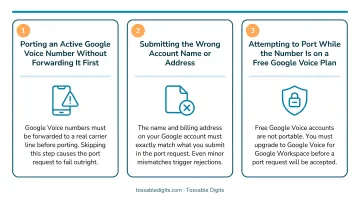
- Closing your Google Voice account early — The receiving carrier will reject the request if the number no longer exists. Wait for written or email confirmation from the new provider before touching your Google Voice account.
- Entering the wrong account number or PIN — The account number is your Google Voice phone number, not a billing account number. The PIN is your voicemail PIN, not your Google password. Mismatches are the leading cause of failed ports, so verify every character before submitting.
- Submitting while another port is already open — Google Voice and receiving carriers may reject the request if there's a conflicting pending port. Cancel any existing requests before initiating a new one.
Troubleshooting Port Problems
Port errors are common and fixable once you know where the transfer broke down.
"Carrier info doesn't match" rejection
The submitted details don't align with what Google has on file. To fix it:
- Re-enter your name exactly as it appears on your Google account
- Spell out address fields in full — use "Street" instead of "St.", "Avenue" instead of "Ave."
- Confirm the correct 4-digit account PIN (especially on shared or family plans)
Number still shows "locked" after payment
The unlock either didn't process or didn't register on Google's end. Try this:
- Clear your browser cache, then reload the unlock page
- Check Google Pay transaction history to confirm the charge went through
- If no charge appears, re-submit the $3 unlock fee and wait a few minutes before refreshing
Port stuck or delayed beyond the expected timeline
A "notice" or "exception" flag on the transfer order is the most common culprit with Google Voice ports. To resolve it:
- Contact your receiving carrier directly — don't wait for it to self-resolve
- Ask them to check for and clear any holds on the port request
- If the first agent can't do it, ask them to escalate; some carriers require manual intervention
What to Do After Your Port is Complete
Once the new provider confirms the port, verify calls and texts are working on the new number. Then decide what to do with your Google Voice account.
For 90 days after porting, incoming calls and messages to the old number are forwarded to the Google Voice account — this gives you a transition window. Use this time to update contacts, profiles, and any services that use the old number.
Consider keeping the Google Voice account active as a call-forwarding buffer during this period, or request a new Google Voice number if you need it for other uses. Once a number is ported out, it's removed from the account permanently.
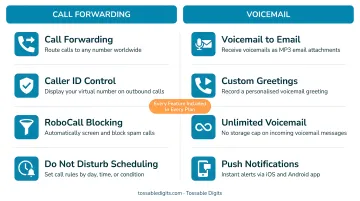
If you're looking for a provider that goes beyond basic call forwarding, Tossable Digits is worth considering. It accepts ports from Google Voice with no porting-in fees and typically completes transfers in 1–5 business days. Every plan includes:
- No contracts, cancel anytime
- Unlimited SMS and call forwarding to any phone
- Voicemail-to-email with MP3 attachments
- Call recording, call screening, and robocall blocking
- IVR auto-attendants for professional call routing
Frequently Asked Questions
Is it possible to port out a Google Voice number?
Yes — any personal Google Voice number can be ported out after paying the $3 unlock fee (or for free if the number was originally ported in). The process is initiated through the receiving carrier, not Google.
How long does it take to port a number out of Google Voice?
The unlock is immediate, but the full port typically takes a few hours to 1-2 weeks depending on the receiving carrier's processing time. Simple ports often complete within one business day.
Can I transfer my Google Voice number to a different Gmail account?
This is a transfer (not a port) within Google and follows a different process. It involves requesting a transfer through Google Voice settings and is subject to eligibility requirements.
Can I port my Google Voice number to a cell phone?
Yes — you can port a Google Voice number to a mobile carrier by unlocking it first, then providing the carrier with your Google Voice number as the account number and your voicemail PIN. The number will then function as a standard mobile number.
How much does it cost to port out of Google Voice?
The unlock fee is $3 USD, charged by Google via Google Pay. However, if the number was originally ported into Google Voice from a mobile carrier, there is no fee to unlock it.
What happens to my Google Voice messages after I port out?
All messages, voicemails, and call history remain in the Google Voice account after porting out — only the phone number moves to the new provider.