Introduction
If you're trying to register a QQ account outside China, the first obstacle is the same for everyone: you need a working Chinese phone number. Phone verification is now mandatory for all new QQ accounts—there's no workaround. QQ has 508 million mobile monthly active users as of Q4 2025, and whether you're connecting with friends, joining gaming communities, or accessing China-linked services, that +86 number is the entry point.
The registration process differs significantly depending on your location. If you're physically in China, obtaining a local +86 number is straightforward. If you're registering from abroad, the challenges are real: SMS delivery restrictions, carrier limitations, and services that claim to work but don't. This guide covers both scenarios—what works, what doesn't, and why.
Key Takeaways
- QQ requires phone number SMS verification—there's no bypass option
- Users in China can get a physical SIM from China Mobile, China Unicom, or China Telecom using a passport
- International numbers (including US +1) often work for QQ registration and basic messaging
- virtual phone numbers typically fail—use real, carrier-grade virtual numbers instead
- Expect possible failures from regional restrictions or security flags—retry with a different number if needed
Do You Actually Need a Chinese (+86) Number, or Will Any Number Work for QQ?
This is the most common point of confusion. QQ's registration interface displays a dropdown for international country codes, including US +1 numbers, but the primary instruction explicitly states "Please use your phone +86 to send SMS." Here's what this actually means:
Two distinct user scenarios exist:
Full-feature access (users in China) — QQ Wallet, payment integrations, QQ Games login, and certain mini-programs all require a Chinese +86 number linked to your account.
Basic access (users outside China) — General messaging, voice/video calls, file sharing, and social features work fine with international numbers. Payment services are off the table, but core communication functions remain available.
Where most registrations actually fail: virtual phone detection. QQ actively screens for and blocks virtual phone numbers regardless of whether they're Chinese or international. The real question isn't which country code you use — it's whether your number is carrier-issued or a verified non-virtual phone virtual number.
How to Get a Chinese Phone Number for QQ: Step-by-Step
This section covers three methods in order of reliability: physical Chinese SIM card, Chinese eSIM, and virtual international number. Your location determines which option works best.
Method 1: Get a Physical Chinese SIM Card (Best for Users in China)
The in-person process:
Visit an official carrier store—China Mobile, China Unicom, or China Telecom (not third-party resellers). Bring your passport with a valid visa. The process typically takes under 10 minutes:
- Select a prepaid plan - Choose based on your data and call needs
- Complete real-name registration - Provide passport details, submit to biometric verification and photo capture
- Receive your active +86 number - The SIM activates immediately
Carrier comparison for QQ users:
- China Mobile - Widest nationwide coverage, ideal for travelers visiting multiple cities
- China Unicom - Cheapest prepaid plans, best for city-based short stays
- China Telecom - Strongest in southern China
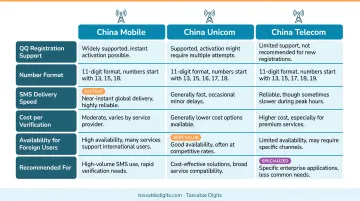
For most QQ-only use cases, any of the three carriers works fine.
Number retention for frequent travelers:
If you visit China periodically and want to keep the same number active between trips, all three carriers offer a "Number Retention" (停机保号) service for approximately 5 RMB per month. This maintains your number without requiring an active monthly plan.
Method 2: Get a Chinese eSIM (For Dual-SIM Phone Users in China)
Official carrier eSIMs from China Mobile or China Unicom provide a real +86 number identical in function to a physical SIM. However, limitations apply:
Device compatibility requirements:
- Your device must support eSIM functionality
- Current compatibility is restricted to specific models (primarily certain Apple Watch models and limited iPhone variants like iPhone Air A3518)
- Real-name registration remains mandatory—you'll need to visit a carrier store or upload passport documents through the carrier's app
Key advantage: No physical SIM swap needed, making it ideal for users who want to keep their home country number active simultaneously on a dual-SIM device.
Reality check: Chinese carrier eSIMs primarily support "One-Number Dual-Terminal" (一号双终端) features for smartwatches, not general smartphone use. Tourist eSIM accessibility remains limited compared to physical SIMs.
Method 3: Use a Virtual International Number (For Users Outside China)
QQ sends an SMS verification code to the number provided during registration. A real, non-virtual phone virtual number from a reputable provider can receive this code and complete registration, even with a non-Chinese country code.
How it works:
Tossable Digits offers US and international virtual numbers with SMS-to-email forwarding, so verification codes land in your inbox instantly. The numbers are real carrier-grade lines (not virtual phone), and no long-term contract is required, making the service practical for one-time QQ registration.
Critical requirement:
The number must be non-virtual phone. QQ's verification system actively screens for and rejects virtual phone numbers. Free services like Google Voice or TextNow typically fail. A carrier-grade virtual number substantially improves success rates.
Tossable Digits advantages for QQ registration:
- Real virtual numbers that pass verification screening
- SMS forwarding to email for instant code delivery
- No contract required — cancel anytime after registration or keep the number long-term
- US numbers activate immediately
- International numbers available from 84 countries
What to Prepare Before Registering QQ
Before starting the registration process, have these elements ready:
Account setup requirements:
- A nickname for your profile
- A secure password meeting QQ's character requirements
- Your chosen phone number (based on your location and intended use)
With those ready, you'll also want to prepare for two common friction points in the registration flow.
QQ uses sliding puzzle or image-based captcha verification during registration. If you're on a VPN or proxy, this step is more likely to fail — attempt registration without one first, since QQ's international version is accessible globally.
QQ's registration interface defaults to Chinese. Key buttons to recognize:
- 注册 = Register
- 确定 = Confirm
- Switch to English using the language dropdown at the top of the registration page
Common Mistakes That Block QQ Registration
Three issues account for the majority of failed QQ registrations:
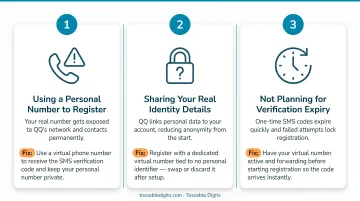
Using a virtual phone number — Free virtual numbers from Google Voice, TextNow, and similar services are rejected by QQ's verification system. The SMS code either never arrives or the number is flagged before it's sent. Switch to a non-virtual phone number to fix this.
Repeated attempts from the same IP — QQ's anti-bot system flags rapid repeat attempts and can temporarily block your IP or device. Wait at least 30 minutes between tries, clear your browser cache and cookies, and consider switching to the mobile app instead of the web version.
Entering the phone number incorrectly — QQ requires selecting your country code from a dropdown separately from the number itself. Entering the country code inside the number field causes verification to fail silently. Select your country code from the dropdown first, then enter the number without a + prefix.
Troubleshooting QQ Phone Verification Failures
Problem: SMS verification code never arrives
Likely causes:
- The number is virtual phone-based and rejected before code delivery
- SMS is delayed due to international carrier routing
- The code expired (QQ codes expire within 10 minutes)
Steps to try:
- Confirm your number is non-virtual phone and carrier-grade
- Request a new code after waiting 2-3 minutes
- Verify the number is entered correctly with the right country code selected from the dropdown
Problem: "Service is currently busy" or "Exceeded attempts limit" error
Likely cause: QQ's servers flagged your device or IP for too many registration attempts.
How to fix it:
- Stop retrying immediately
- Wait at least 30-60 minutes before attempting again
- Clear all browser data (cookies, cache, history)
- Try using the QQ mobile app rather than the web browser—the app has higher success rates for first-time international registrations
Problem: Registration completes but account is immediately suspended
Likely cause: QQ's security system detected unusual behavior (new account + foreign IP + new device all at once).
Your next move: Complete the identity verification prompt at login, which usually requires re-entering your phone number for SMS re-verification. Because QQ may prompt this check again days or weeks later, use a number you can access more than once — not a single-use disposable.
Conclusion
Two clear paths exist depending on your location. Users in China should get a physical SIM or eSIM from an official carrier using their passport—the process takes under 10 minutes at any China Mobile, China Unicom, or China Telecom store. Users outside China can register with a real non-virtual phone virtual number from services like Tossable Digits.
Most registration failures come down to three avoidable issues:
- Using a virtual phone number instead of a real virtual number
- Making too many rapid attempts and triggering rate limits
- Incorrect phone number formatting for the selected country
Nail these three, and first-try success becomes the rule rather than the exception.
Frequently Asked Questions
Can foreigners get a China phone number?
Yes, foreigners can legally obtain a Chinese phone number by visiting an official carrier store with a valid passport. No Chinese residency is required—only a valid visa for the real-name registration process mandated under MIIT Order No. 25.
Is +86 a US number?
No, +86 is China's country code. The US country code is +1. A +86 number indicates a Chinese mobile or landline number issued by a Chinese telecommunications carrier.
Can I use QQ outside China?
Yes, QQ is accessible outside China without a VPN for basic messaging and social features. The standard QQ app works internationally, though some payment-linked features like QQ Wallet may have geographic restrictions requiring Chinese banking credentials.
Can I set QQ to English?
Yes, QQ supports multiple languages including English. You can switch the language in the app settings or via the language option (语言) on the registration/login page — recent versions also detect language automatically based on your device settings.
Does QQ accept US phone numbers for registration?
Yes, QQ accepts US (+1) phone numbers for SMS verification during registration in most cases. The number must be carrier-grade — QQ blocks free virtual phone services like Google Voice or TextNow, but paid virtual numbers from established providers often work without issue.
What should I do if QQ keeps rejecting my phone number during sign-up?
Run through these steps in order:
- Confirm you're using a carrier-grade number, not a free virtual phone service
- Switch to the QQ mobile app instead of the web version
- Clear your browser cache completely
- Wait at least 30 minutes before retrying to avoid triggering QQ's anti-bot rate limiting