Introduction
When you forward business calls to your personal phone, will customers see your private number? This is a common worry for small business owners, real estate agents, and anyone managing a separate business line. It's a fair concern — exposing your personal number leads to after-hours calls, privacy loss, and blurred lines between work and personal life.
This post covers what number callers actually see when calls are forwarded, how the "two-call" system protects your privacy, and when your personal number can accidentally slip through.
Key Takeaways
- Callers see the number they dialed (your business or virtual number), not your forwarding destination
- Call forwarding creates two separate call "legs" so callers never connect directly to your personal line
- Your personal number can be exposed through voicemail greetings or callback mistakes
- Using a virtual number lets you return calls while still showing your business number — not your personal one
What Number Do Callers See When a Call Is Forwarded?
Direct answer: When a call is forwarded, the caller continues to see the number they originally dialed—not the number the call is being routed to. Their caller ID display does not change mid-call.
This holds true whether you're forwarding from:
- A business line
- A toll-free number
- A virtual number
- A local number in any area code
What You See vs. What They See
The person receiving the forwarded call (you) typically sees the caller's number on their device, not your own number or the virtual number. This is intentional — it lets you identify who's calling before you answer.
The caller's screen, on the other hand, stays locked on the number they dialed. From their perspective, they're calling your business number directly. That separation between what each side sees also explains why callers occasionally notice subtle routing cues without ever seeing where the call actually landed.
Subtle Signs of Forwarding (That Don't Expose Your Number)
Callers may notice indirect signs that a call is being forwarded:
- A slight delay before ringing begins
- A brief carrier message saying "call is being forwarded"
- A different-sounding ring tone
None of these reveal your personal number — just that the call is routing through a network. Your actual forwarding destination stays completely hidden from the caller.
Why This Happens: The Two-Call Architecture Explained
How Call Forwarding Actually Works
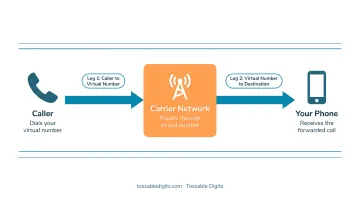
When call forwarding is active, the carrier creates two separate call legs:
- Leg 1: The incoming call from the customer to your business number
- Leg 2: An outbound call from the carrier's network to your personal/forwarding destination number
These two legs are bridged together. The customer never "sees" or connects directly to your personal number because the second call leg is initiated by the carrier's network, not by the customer. Their call ends at the carrier level.
The Cost Implication
Because the carrier places an outgoing call to your destination, you may be billed for that outbound leg. Major US carriers explicitly state this in their forwarding policies:
| Carrier | Billing Policy |
|---|---|
| AT&T | Forwarded calls are billed for the length of the call and may incur long-distance and/or roaming charges |
| Verizon | Billed for all forwarded calls according to your plan, just as if you answered from your mobile phone |
| T-Mobile | Billed from when the network begins processing the call until the call ends |
Virtual number providers like Tossable Digits typically include call forwarding in their plans with no per-minute charges, which sidesteps this carrier billing structure altogether.
Understanding how billing works also depends on which type of forwarding you're using — and there are two distinct modes.
Unconditional vs. Conditional Forwarding
Unconditional forwarding (typically activated with *72 in North America) routes all calls immediately to your destination number.
Conditional forwarding routes calls to your destination only under specific conditions — activate it with *71 or *68 depending on your carrier:
- Your line is busy
- You don't answer after a set number of rings
- Your phone is unreachable
In both cases, the caller ID behavior is identical—the caller sees the number they dialed, never your forwarding destination.
When Your Personal Number Can Accidentally Get Exposed
The Voicemail Risk
The most common exposure happens when your personal phone's native voicemail picks up before your virtual number's voicemail does. Many default voicemail greetings read out your personal phone number aloud: "You've reached 555-867-5309..."
This reveals your private number to the caller immediately.
AT&T explicitly warns: "Call forwarding overrides your wireless voicemail," meaning your personal voicemail can intercept business calls if not configured properly.
How to prevent this:
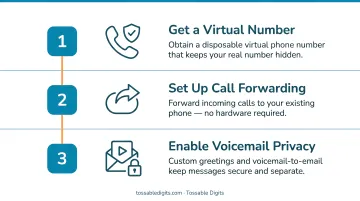
- Configure your virtual number's voicemail to answer before your personal phone's voicemail
- Record a custom greeting on your virtual number that doesn't mention any phone number
- Use voicemail-to-email features to retrieve messages without callers reaching your personal voicemail
Calling Back from the Wrong Number
If you call a customer back directly from your personal cell phone rather than through your virtual number, your personal number shows up on their caller ID instead of your business number.
Always call back using your virtual number's outdial feature, which displays your business number on the recipient's caller ID.
Carrier-Level Announcements
Some carriers play a brief automated message to callers indicating the call is being forwarded. Callers won't hear your number, but they'll know the call was redirected. Check with your provider about whether this can be disabled.
What Number Appears on YOUR Phone When You Answer a Forwarded Call?
When a forwarded call reaches your personal phone, you typically see the original caller's number (or their caller ID name if available) on your screen—not your own virtual number.
This helps you identify who's calling before answering, but it doesn't distinguish between personal calls and business calls coming through your virtual number. That gap is where provider-specific features come in.
Provider-Specific Solutions
Some virtual number services handle this differently by:
- Displaying the virtual number briefly before connecting
- Including a prepended label or announcement
- Playing a "call whisper" message (heard only by you) indicating the call arrived via your business line
Industry research shows that call whisper features are heard only by you, giving you the context you need before the call connects — without alerting the caller.
This helps you answer appropriately: "Thanks for calling [Business Name]" versus a casual personal greeting.
That said, this behavior varies by provider — check how your specific service handles incoming display before building it into your business call workflow.
How Virtual Numbers Give You Full Control Over Caller ID
A dedicated virtual number acts as a permanent, public-facing number that always appears on caller ID. Your personal number is never part of the equation.
How it works in practice:
- You get a local, toll-free, or international number
- All calls to that number forward to whatever device you choose
- Callers only ever see the virtual number, wherever you are or what device you're using
You can change your forwarding destination at any time — swap between cell, landline, home office, or even international numbers — without the caller ever knowing. Your caller ID presentation stays consistent. That flexibility matters most for:
- Remote workers who move between locations
- Real estate agents who want local presence across multiple markets
- Small businesses scaling operations without changing their public number
- Campaign tracking with different numbers for different advertising channels
Tossable Digits Solution
With a Tossable Digits virtual number, every plan includes:
- Call forwarding to any number globally
- Voicemail-to-email with MP3 attachments
- IVR auto-attendant and call routing
- Call recording with compliance announcements
- Caller ID control for outbound calls
- RoboCall blocking
All while ensuring callers always see your chosen virtual number and your personal number stays completely private.
Multiple Numbers, Multiple Identities
Businesses are moving fast on this. The Mobile virtual phone market is projected to reach $104.92 billion by 2030, growing at 12.9% annually — driven largely by companies adopting dedicated virtual lines for exactly this purpose.
You can maintain separate virtual numbers for:
- Different campaigns (track which ads generate the most calls)
- Different departments (sales, support, billing)
- Different locations (local presence in multiple cities)
Each forwards to the right destination while presenting a professional, consistent caller ID to customers.
The FCC's STIR/SHAKEN framework and the Truth in Caller ID Act both permit virtual numbers for outbound caller ID — as long as there's no intent to defraud and the provider verifies your authorization to use the number.
Frequently Asked Questions
What number do customers see if I forward their call?
Customers see the number they originally dialed—your business or virtual number. The forwarding destination (your personal phone) is never shown to them. This applies to local numbers, toll-free numbers, and international numbers.
Does 31 hide your number?
31 is a GSM code used to block caller ID on outgoing calls you place (so the recipient sees "Unknown" or "Private"). It's separate from call forwarding—it hides your number on calls you make, not on calls forwarded to you.
What is the difference between *71 and *72 call forwarding?
*72 typically activates unconditional call forwarding (all calls forward immediately) in North America, while *71 is used by some carriers like Verizon for conditional forwarding (forwards only when busy or unanswered). Usage varies by carrier, so confirm with your provider.
Can callers tell their call is being forwarded?
Callers generally cannot tell, but may notice subtle signs like a brief delay, a carrier message saying "your call is being forwarded," or a slightly different ringtone. None of these expose the forwarding destination.
Will my personal number be visible when I answer a forwarded call?
When you answer a forwarded call, your screen shows the caller's number—and your personal number remains invisible to them throughout the call.
Does call forwarding still work if my phone is turned off?
With network-level forwarding (including virtual number forwarding), the carrier reroutes calls before they ever reach your device. Forwarding continues to work even when your phone is powered off or out of coverage.