Introduction
Toll-free numbers project instant business credibility and national reach—50.9% of Fortune 500 companies use 800 prefixes specifically to signal stability. But that credibility evaporates if calls only reach a desk phone when you're mobile. Forwarding your 800 number to your cell phone fixes that — you stay reachable wherever you are, and no important call slips through.
While the concept sounds simple, results vary based on your provider's routing settings, the forwarding type you select, and whether you test correctly before going live. Misconfigured ring timeouts and missing voicemail fallbacks cause the majority of forwarding failures—not technical limitations of the service itself.
Getting it right means knowing what to configure upfront. Here's exactly how to do it — including the settings that matter, the mistakes to avoid, and how to troubleshoot when calls aren't coming through.
Key Takeaways
- Forwarding an 800 number to a cell phone is done through your toll-free provider's dashboard—not your mobile carrier
- You need an active 800 number from a virtual phone provider and a US-based cell number as the destination
- Providers offer multiple forwarding types (standard, simultaneous, sequential)—pick the right one or calls may not reach you reliably
- The most common mistakes: skipping a live test, misconfiguring ring timeout, and not setting a fallback voicemail
- Callers dial toll-free at no cost to them; you're billed for inbound minutes on your provider plan
How to Forward an 800 Number to Your Cell Phone
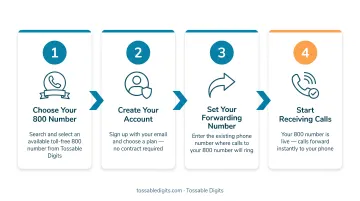
Step 1: Log Into Your Toll-Free Number Provider's Dashboard
Access your provider account online. 800 number call forwarding is managed entirely within the provider's platform, not through mobile carrier star codes (which only apply to forwarding from a cell phone outward).
Confirm your account is active and your 800 number is provisioned. If you don't yet have an 800 number, research virtual phone number providers that include toll-free numbers with call forwarding. Tossable Digits, for example, Tossable Digits, for example, includes forwarding, IVR, and voicemail-to-email on every plan without a contract.
Before moving to routing settings, confirm:
- Your 800 number shows as active (not suspended or porting)
- You have account admin access to edit call routing
- You know the cell number you want calls forwarded to
Step 2: Navigate to the Call Routing or Forwarding Settings
Locate the "Numbers" or "Call Routing" section of the dashboard—the exact label varies by provider but is typically found in the main navigation column. If your account holds multiple numbers, confirm you're editing the right one.
Step 3: Enter Your Cell Phone Number as the Forwarding Destination
Type in your full 10-digit cell phone number including the area code. Confirm the number is an active, voice-capable US line.
Set your preferred caller ID display preference:
- Choose whether the caller's number or your toll-free number appears on your cell when a forwarded call comes in
- Getting this right ensures you can identify forwarded calls and return them from the correct number
Adjust the ring seconds slider:
- Default is often 20 seconds
- Set it long enough for your cell to ring before forwarding to voicemail
- 15–20 seconds is the recommended range for most setups
Step 4: Save Settings and Test with a Live Call
Save all routing settings and immediately place a test call to your 800 number from a separate phone. Verify the caller ID displays as expected and that your cell's voicemail engages correctly if the call goes unanswered. If the provider's ring timeout ends before your carrier voicemail picks up, the call may disconnect—increase the ring timeout to 25–30 seconds to fix this.
Understanding Your 800 Number Forwarding Options
Most toll-free providers offer several routing methods, but the default "Standard Forwarding" isn't always the right fit. The method you choose directly determines whether callers reach someone or hang up frustrated.
Standard Forwarding
Routes calls to one number sequentially. Simplest setup for solo operators. If the line is busy or unanswered, the call proceeds to voicemail or disconnects depending on configuration.
When it makes sense:
- Single-person operations
- Freelancers
- Businesses where one person handles all inbound calls
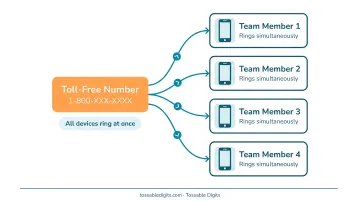
Simultaneous Forwarding
Rings multiple numbers at the same time—useful for small teams where any member can pick up. First person to answer gets the call.
When it makes sense:
- Small businesses with 2-3 staff covering the same line
- When you want your cell and desk phone to ring together
- Cuts the 78% abandonment rate tied to unanswered calls
Sequential (Find-Me) Forwarding
Rings numbers one after another in a preset sequence. If the first number doesn't answer within the allotted ring time, it moves to the next.
When it makes sense:
- Tiered coverage setups
- Ring your cell first, then a colleague, then voicemail as last resort
- Solo operators with backup coverage needs
Conditional Forwarding (Business Hours Rules)
Some providers allow time-based rules—forward calls to your cell during business hours and to voicemail or an answering service after hours. Not all basic toll-free providers include this feature, so confirm availability before committing to a plan.
When it makes sense:
- Businesses that only take calls during set hours
- Routing after-hours calls to a voicemail with a custom greeting
- Avoiding late-night calls on your personal cell without missing business inquiries
Common Mistakes When Forwarding an 800 Number to Your Cell
A few configuration missteps account for most forwarding failures. Knowing what to watch for saves you from discovering problems the hard way — when a real customer calls.
Not Testing After Setup
Many forwarding failures surface only when a customer calls and the call drops or lands in a generic voicemail. Always test immediately after saving settings using a call from a different phone.
Misconfiguring the Ring Timeout
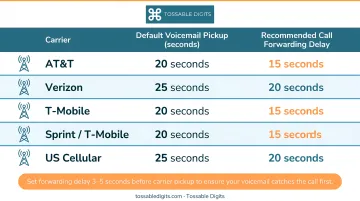
Setting ring seconds too low means calls disconnect before your cell even rings. Too high, and callers sit in silence. Each carrier has a built-in voicemail pickup window:
Major carrier voicemail pickup times:
- Verizon: 20-30 seconds (hard-coded at system level)
- AT&T: ~20 seconds (adjustable up to 30 seconds)
- T-Mobile: ~30 seconds (adjustable up to 30 seconds)
Set your provider's ring timeout to 15-20 seconds so your professional business voicemail intercepts the call before your personal cell voicemail does.
Skipping the Caller ID Setting
Forwarding without enabling toll-free caller ID means your cell shows the caller's number but not the 800 number — you can't tell a business call from a personal one before answering. Some setups also display your toll-free number to callers on callbacks, which can catch them off guard.
No Voicemail Fallback Configured
If neither the provider's voicemail nor the cell carrier's voicemail is set as a final destination, unanswered calls disconnect — leaving callers with no way to leave a message and no reason to call back.
Troubleshooting 800 Number Forwarding Issues
Most forwarding setup errors are fixable without contacting support — the culprit is usually one of four common configuration problems.
Calls Are Going Straight to Voicemail Without Ringing
Ring seconds set too low or an active Do Not Disturb mode on your cell are the usual culprits. Check your provider dashboard's ring timeout, then confirm your phone isn't filtering forwarded numbers as spam.
Steps to resolve:
- Increase ring seconds to 25-30 seconds
- Disable spam call filtering temporarily
- Retest immediately
Callers Hear a Busy Signal or the Call Disconnects
The forwarding number was likely entered incorrectly — a missing area code or extra digit is enough to break the connection. It's also worth checking your carrier plan: prepaid carriers like Cricket cap call forwarding at 1,000 minutes per month and prohibit commercial use.
Steps to resolve:
- Re-enter the destination number carefully
- Confirm it is 10 digits with area code
- Verify with a direct test call to that cell number
- Confirm your carrier plan allows commercial call forwarding
Forwarded Calls Show the Wrong Caller ID on Your Cell
This is a toggle issue in your dashboard — the Caller ID passthrough setting controls whether forwarded calls display the original caller's number or your toll-free number. Neither option is wrong; it depends on your workflow.
To fix it:
- Go to the Call Routing section in the dashboard
- Locate the Caller ID toggle
- Switch to the preferred display option and save
- Place a test call to confirm the change took effect
Cell Phone Is Receiving Calls But Audio Quality Is Poor
Poor audio on forwarded calls is almost always a cellular signal problem on the receiving end, not a configuration issue. Forwarding adds a leg to the call path, but it doesn't degrade digitally-originated audio on its own.
- Test reception in a different location
- If quality issues persist, contact your mobile carrier
Alternatives to Basic 800 Number Forwarding
Forwarding to a single cell phone number works well for solo operators but has real limits at scale—missed calls, no call recording, no team visibility into inbound activity, and no business-hours routing on basic setups. More robust options exist.
Virtual Phone System with IVR and Voicemail-to-Email
Best for businesses with multiple callers, departments, or staff who need calls routed intelligently. An IVR greets callers and directs them to the right person or queue rather than ringing one cell phone.
The setup takes slightly more time than basic forwarding, but it eliminates missed calls and delivers professional call handling from day one. Tossable Digits includes IVR, voicemail-to-email with MP3 attachments, and call recording in every plan — so upgrading from basic forwarding to a full virtual number setup requires no provider switch and no new contracts.
Simultaneous Ring Groups
The right fit for small teams where multiple people should be reachable on the same 800 number. Ring groups eliminate the single point of failure of one person's cell.
Configuration requires adding each team member's number to the routing — a few extra minutes of setup that can reduce the 62.2% missed call rate small businesses face.
Porting Your Existing 800 Number to a Virtual Provider
If your current carrier doesn't support flexible forwarding rules, porting your existing 800 number to a virtual provider unlocks advanced routing without changing your public-facing number.
A few things to know before you start:
- Toll-free port requests can take up to 7 days to complete
- RespOrg changes requiring a Letter of Agency must be addressed within 2 business days
- Confirm your existing provider permits toll-free number porting before initiating
Conclusion
Forwarding an 800 number to a cell phone is straightforward when done through the toll-free provider's dashboard. The most important steps are entering the correct destination number, choosing the right forwarding type, setting an appropriate ring timeout (15-20 seconds), and testing before going live.
Most forwarding failures trace back to misconfigured ring seconds, missing voicemail fallback, or skipped testing. Once the basics are working, there's room to build on them. Platforms like Tossable Digits include call recording, IVR, team routing, and voicemail-to-email in every plan — so you can add those features without changing your 800 number or switching providers.
Frequently Asked Questions
Can I forward an 800 (toll-free) number to a cell phone?
Yes, 800 number forwarding to a cell is standard and managed through the toll-free provider's dashboard, not the mobile carrier. The cell phone must be an active US voice-capable number.
Can you port an 800 number to a cell phone?
No. Porting moves ownership of the number to a new provider, while forwarding routes calls to a destination. Toll-free numbers cannot be ported directly onto a standard cell phone line but can be ported to a virtual phone provider that then forwards calls to any cell.
How much does a call forwarding service cost?
Costs vary by provider. Pay-as-you-go providers like Twilio charge $0.0220 per minute, while bundled plans like Nextiva include 2,000 minutes for $25/user/month. Evaluate based on your expected monthly inbound call volume before committing to a plan.
How do I set up call forwarding for a business?
Obtain a toll-free or virtual business number from a provider, then log into the provider's dashboard to set your forwarding destination. Most platforms complete the setup in under five minutes. See the step-by-step section above for a full walkthrough.
Will callers be charged when calling my forwarded 800 number?
No. Toll-free numbers are free for the caller by definition—the business account holder absorbs the cost of inbound toll-free minutes per their provider's plan.
What is the difference between conditional and unconditional call forwarding for an 800 number?
Unconditional forwarding routes every call to the destination regardless of time or status. Conditional forwarding applies rules such as business hours, busy status, or no-answer scenarios before routing. Not all entry-level toll-free providers support conditional forwarding.